
IBPS Clerk Final Form Preview Checklist: 25 Critical Checks
Quick Overview
Practice free quizzes, mock tests, current affairs and exam-wise preparation resources on ExamTune.
Download Official IBPS Application Instructions
Read the official IBPS instructions for application preview, Complete Registration, document uploads, online payment, e-receipt and final application printout.
Last Updated: 4 August 2026
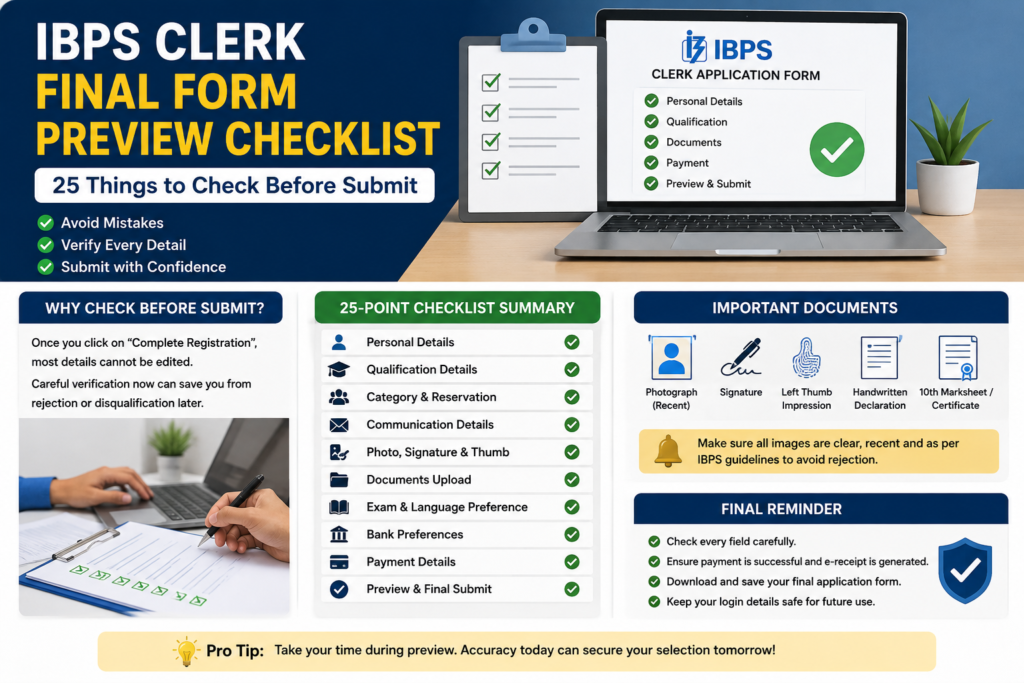
The IBPS Clerk Final Form Preview Checklist is the most important review candidates should complete before clicking Complete Registration. A spelling error, incorrect category, wrong state, incomplete qualification detail, unclear document or unsuccessful payment can create problems during the examination, document verification or provisional allotment.
Use this IBPS Clerk Final Form Preview Checklist to verify your personal information, eligibility, state selection, bank preferences, uploaded documents, payment status, e-receipt and final application PDF before submission.
Quick Answer: Check your name against the Class 10 certificate or valid date-of-birth proof, confirm the mobile number and email ID, verify category and State/UT, review graduation details and bank preferences, inspect every uploaded document, and confirm successful payment. Click Complete Registration only after every item is correct.
Why the IBPS Clerk Final Form Preview Checklist Matters
IBPS allows candidates to use the Save and Next facility while completing the application. This stage should be used to verify and modify information before final submission. After clicking Complete Registration, normal editing may no longer be available.
The application is complete only after the required sections are filled, documents are uploaded, declarations are accepted and the application fee is successfully paid. A provisional registration number alone is not proof that the complete form has been submitted.
The State or Union Territory selected for provisional allotment is especially important. Review this choice carefully because it is treated as final under the application instructions.
IBPS Clerk Form Preview: Quick Summary
| Area to Check | What to Verify | Risk if Incorrect |
|---|---|---|
| Personal details | Name, DOB, gender, mobile number and email ID | Identity or communication problems |
| Eligibility | Category, nationality and educational qualification | Eligibility or document-verification issue |
| State and language | Selected State/UT and local-language details | Allotment or language-proficiency problem |
| Uploaded documents | Correct file, field, format, size and preview | Rejection or verification difficulty |
| Payment and submission | Successful status, e-receipt and final PDF | Incomplete application |
IBPS Clerk Final Form Preview Checklist: 25 Critical Checks
1. Confirm That You Are Using the Official Application Portal
Open the application link through the official IBPS website or the official CRP registration portal. Never enter your registration number or password on unknown websites, social-media posts or advertisements.
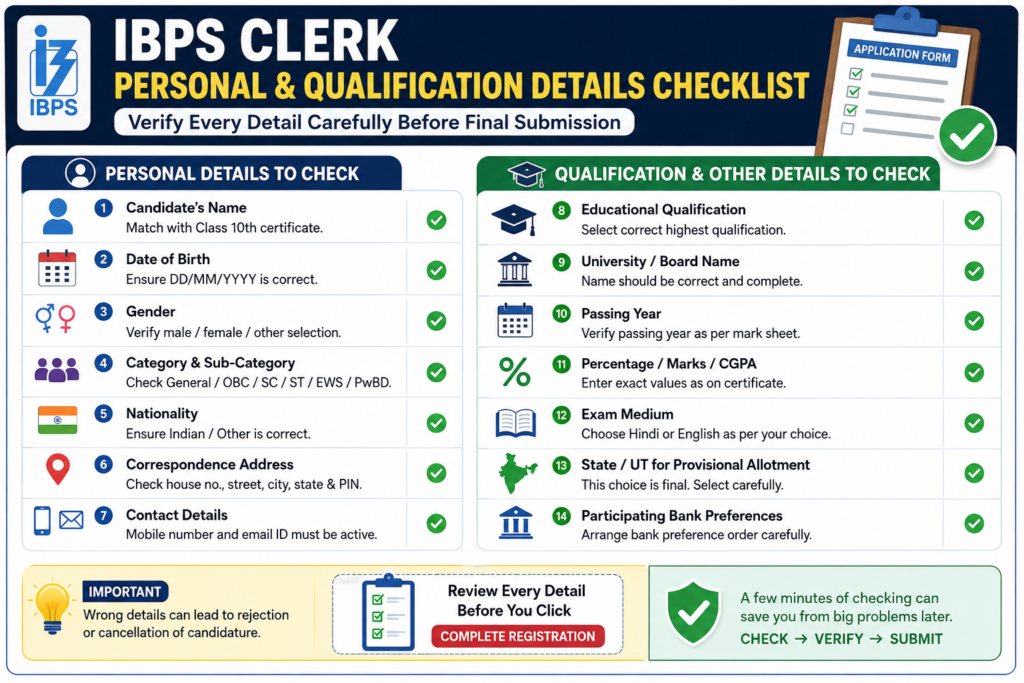
2. Match Your Name With the Class 10 Certificate or DOB Proof
Check the spelling, sequence and spacing of your first, middle and last name. The name entered in the application should match the documents used for identity and date-of-birth verification.
3. Check Name-Change Information
If your current name differs from the name printed on the supporting certificate, verify that the relevant name-change information has been entered correctly and that documentary proof is available.
4. Verify the Registered Mobile Number
Make sure the mobile number is correct, active and accessible. Do not add an unnecessary prefix. Keep this number active throughout the recruitment process.
5. Verify the Registered Email Address
Check every letter, number, dot and domain in the email address. An incorrect email ID can prevent you from receiving registration, payment and recruitment communication. Read the ExamTune guide on IBPS Clerk registration email not received if confirmation is delayed.
6. Check the Date of Birth
The date of birth should match the Class 10 certificate or accepted date-of-birth proof. Check the day, month and year carefully.
7. Confirm Category and Sub-Category
Verify General, EWS, OBC-NCL, SC, ST, PwBD, Ex-Serviceman or any other applicable category. Make sure you can produce the required valid certificate in the prescribed format.
8. Verify Nationality and Eligibility Declarations
Review all nationality, citizenship and eligibility responses. Select only the option that correctly applies to you.
9. Check the State or Union Territory Selected for Allotment
This is one of the most important points in the IBPS Clerk Final Form Preview Checklist. Confirm that you have selected the intended State or Union Territory for provisional allotment.
10. Verify Local-Language Information
Check the local-language details linked to the selected State/UT. Candidates may need to satisfy the language-proficiency requirements applicable to the chosen location.
11. Check Graduation Details
Verify the university name, degree, subject or stream, passing date, roll or registration number and other qualification information exactly as shown on the marksheet or certificate.
12. Verify the Qualification Cut-Off Date
Make sure the required qualification was completed by the official eligibility date. Do not treat an expected result as a completed qualification unless the rules expressly permit it.
13. Recheck Percentage or CGPA Conversion
Enter the aggregate percentage using the university’s official method. For CGPA, use the prescribed conversion formula and preserve the supporting conversion proof.
14. Review Work Experience and Optional Details
Enter work experience, computer knowledge and other optional information only when applicable and supported by documents.
15. Confirm Identity-Proof Details
Check the selected identity-proof type and number. The original ID used at the examination should correspond with the details entered in the form.
16. Verify the Examination Medium
Review the selected medium or language version carefully before final submission.
17. Check Examination-Centre Preferences
Verify the selected centre choices and their order. Although IBPS may allot a different centre, candidates should still review the available preferences carefully.
18. Review Participating-Bank Preferences
Check that all required bank preferences have been completed and that the order reflects your actual priority. Do not leave a preference incomplete accidentally.
19. Check the Uploaded Photograph
The photograph should be recent, coloured, clear and uploaded in the correct field. The face should be fully visible against a light background.
20. Check the Live Photograph
Review the live photo captured through the webcam or mobile process. It should be well-lit, clear and directly show the candidate’s face.
21. Check the Signature
The signature should be clear, made by the candidate and uploaded in the correct field. Confirm that it is not blurred, cropped or replaced with another document.
22. Check the Left Thumb Impression
The impression should be clear and properly uploaded. If the left thumb is unavailable, follow the official alternative-finger instruction applicable to your case.
23. Check the Handwritten Declaration
Verify the exact wording, handwriting, ink, clarity and correct upload field. The declaration should not be written in capital letters.
24. Check the Class 10 Certificate and Applicable PDFs
Confirm that the Class 10 or equivalent certificate is clear, complete, readable and uploaded in the required format. For a detailed list, read IBPS Clerk documents required.
25. Review the Declaration, Complete Registration and Payment
Read every declaration, inspect the complete preview and click Complete Registration only after verification. Pay the application fee and confirm that the portal generates an e-receipt and final application form.
Best proof of submission: Keep the system-generated application form, successful payment e-receipt, registration number, password and transaction reference. Check whether the IBPS Clerk form is submitted if the final status is unclear.
Document Upload Verification Table
| Document | Important Check | Common Error |
|---|---|---|
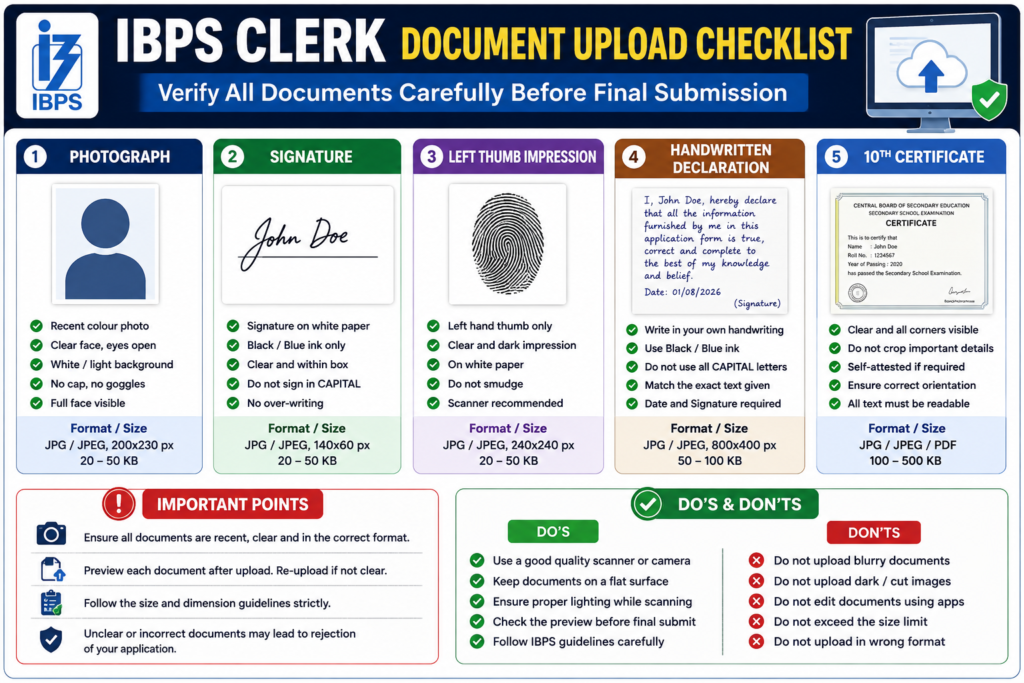
| Photograph | Recent, clear, coloured and correctly placed | Blurred face, dark background or wrong field |
| Live photograph | Good lighting and direct face capture | Mask, sunglasses, shadow or distorted image |
| Signature | Clear and correctly uploaded | Blur, crop, wrong field or another person’s signature |
| Left thumb impression | Clear and properly identified impression | Smudged or incorrectly identified alternative finger |
| Handwritten declaration | Correct wording, candidate’s handwriting and clear image | Capital letters, wrong wording or written by someone else |
| Class 10 certificate | Complete, readable and in the prescribed format | Unreadable, cropped, incomplete or wrong format |
Also review the detailed IBPS Clerk photo and signature size guide before replacing or re-uploading files.
Payment, E-Receipt and Application Print Checklist
The IBPS Clerk Final Form Preview Checklist is not complete until the payment and submission records are verified.
- Confirm that the application payment status is successful.
- Download the e-receipt immediately.
- Download the system-generated final application form.
- Check that the registration number appears correctly.
- Confirm that no Pay Now, Continue Application or Complete Registration option remains pending.
- Save the bank, card, UPI or payment-gateway transaction reference.
- Keep digital and printed copies until the recruitment process ends.
Payment warning: If the e-receipt and application form cannot be generated, log in again and verify the transaction status before making another payment.
Common IBPS Clerk Form Mistakes to Avoid
- Entering a name that does not match the Class 10 certificate or identity proof.
- Choosing the wrong State or Union Territory.
- Selecting an incorrect category without valid supporting documents.
- Using an inactive email address or mobile number.
- Entering the wrong graduation percentage, CGPA conversion or passing date.
- Leaving participating-bank preferences incomplete.
- Uploading a photograph, signature or thumb impression in the wrong field.
- Using the wrong wording or format for the handwritten declaration.
- Clicking Complete Registration before checking the preview.
- Assuming that a provisional registration number proves final submission.
- Closing the portal without downloading the e-receipt and application PDF.
Avoiding these mistakes is the main purpose of the IBPS Clerk Final Form Preview Checklist. Correct every visible error before final submission.
What to Do After Submitting the IBPS Clerk Form
- Download the completed application form and payment e-receipt.
- Store the registration number and password securely.
- Take screenshots of the final application and payment status.
- Review the downloaded PDF for name, category, State and qualification details.
- Keep the registered mobile number and email ID active.
- Check the official website for any permitted correction-window notice.
- Do not create another application merely because an email or SMS is delayed.
If the registration number is missing or displayed as zero, read the guide on IBPS Clerk blank registration number before registering again.
Final Conclusion
The IBPS Clerk Final Form Preview Checklist should be completed before clicking Complete Registration. Verify all 25 points, particularly your name, category, selected State, qualification, bank preferences, uploaded documents and payment stage.
After submission, download the final application PDF and e-receipt. These records are more reliable than depending only on an SMS, email or provisional registration number.
Official Sources
Frequently Asked Questions
Can I edit the IBPS Clerk form after Complete Registration?
Normal editing is not available after Complete Registration. IBPS may later announce a limited correction window for permitted fields, but candidates should verify the preview instead of relying on a future edit facility.
Is a registration number proof that the form is finally submitted?
No. A provisional registration number may be generated before the application, uploads and payment are completed. Downloadable final application and e-receipt records provide stronger evidence.
Which details should be checked most carefully?
Check the name, date of birth, category, State/UT, qualification, examination medium, bank preferences, uploaded documents, payment status and final application PDF.
What is the strongest proof of successful submission?
The strongest records are the completed system-generated application form, successful payment status and downloadable e-receipt.
Can I change the selected State later?
The State or Union Territory selected for provisional allotment is treated as a final choice, so verify it before submission.
What if an uploaded document is unclear?
Re-upload it before submission. An unclear, cropped or smudged photograph, signature, thumb impression, declaration or certificate can create rejection or verification problems.
Should I send the application printout to IBPS?
No. Keep the application printout and e-receipt safely unless IBPS specifically asks for them.
What should I do if payment is deducted but no e-receipt is generated?
Log in again, check the payment and application status, save the transaction reference and avoid paying again until the earlier transaction status is confirmed.
Can I change the bank preference order after final submission?
Normal editing may not be available after final submission. Review the participating-bank preference order carefully before clicking Complete Registration.
What if I notice a mistake after downloading the final application form?
Check whether an official correction window has been announced and whether that specific field is editable. Preserve the application PDF and supporting documents and use the official grievance mechanism when necessary.
Practice free quizzes, mock tests, current affairs and exam-wise preparation resources on ExamTune.