
IBPS Clerk Photo and Signature Size 2026: Exact KB & Pixels
Quick Overview
Practice free quizzes, mock tests, current affairs and exam-wise preparation resources on ExamTune.
IBPS Clerk Photo and Signature Size 2026 must be checked before uploading documents in the online application form. Candidates generally need a recent photograph, signature, left thumb impression and handwritten declaration in the prescribed KB size, pixel dimensions and JPG/JPEG format.
The previous official IBPS Customer Service Associate upload guidelines prescribed a 200 × 230 pixel photograph of 20–50 KB and a 140 × 60 pixel signature of 10–20 KB. The detailed CRP-CSA-XVI notification and the live application portal should be treated as final for the 2026 cycle.
IBPS Clerk Photo and Signature Size 2026: Quick Overview
The IBPS Clerk Photo and Signature Size 2026 table below gives the expected dimensions, KB limits and file formats in one place.
| Document | Dimensions | File Size | Format |
|---|---|---|---|
| Photograph | 200 × 230 pixels | 20 KB–50 KB | JPG/JPEG |
| Signature | 140 × 60 pixels | 10 KB–20 KB | JPG/JPEG |
| Left Thumb Impression | 240 × 240 pixels | 20 KB–50 KB | JPG/JPEG |
| Handwritten Declaration | 800 × 400 pixels | 50 KB–100 KB | JPG/JPEG |
IBPS Clerk Photo and Signature Size 2026: Photo Size in KB and Pixels
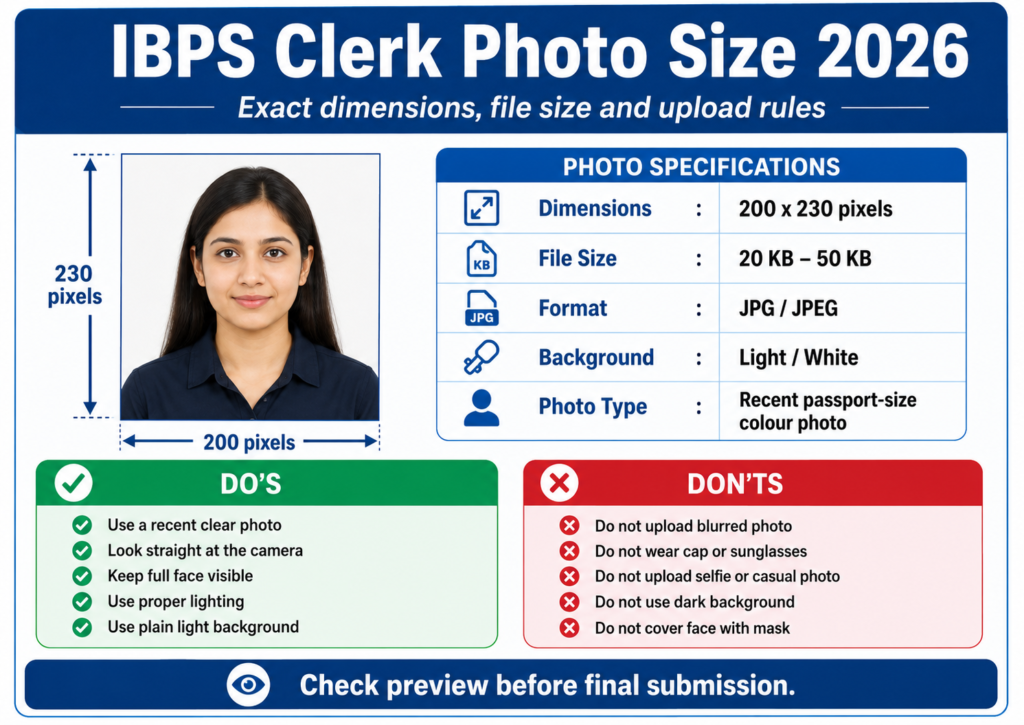
The photograph required under IBPS Clerk Photo and Signature Size 2026 should be a recent passport-style colour image. Its preferred dimensions are 200 × 230 pixels, and the file should normally remain between 20 KB and 50 KB.
IBPS Clerk Photograph Requirements
- Use a recent passport-style colour photograph.
- Use a plain, light-coloured and preferably white background.
- Look directly at the camera with a natural expression.
- Keep the face, eyes and facial features clearly visible.
- Avoid shadows, red-eye, blur and excessive editing.
- Do not wear a cap, dark sunglasses or a face mask.
- Religious headwear may be used if it does not cover the face.
- If wearing spectacles, ensure there is no reflection on the lenses.
IBPS Clerk Photo and Signature Size 2026: Live Photo Requirements
In addition to the scanned photograph, the application process may require a live photograph through a webcam or mobile phone. The portal may display a QR code that candidates can scan to capture the live image using a phone.
Live Photo Do’s
- Use a bright room and a plain light-coloured background.
- Keep the camera at eye level.
- Look straight at the webcam or mobile camera.
- Keep the complete face inside the frame.
- Use a stable internet connection.
Live Photo Don’ts
- Do not use beauty filters or excessive enhancement.
- Do not capture the image in a dark room.
- Do not wear sunglasses, a cap or a mask.
- Do not submit a side-facing, blurred or distant image.
IBPS Clerk Photo and Signature Size 2026: Signature Size in KB and Pixels
The preferred IBPS Clerk signature dimensions are 140 × 60 pixels. The signature image should generally be between 10 KB and 20 KB and saved in JPG or JPEG format.
IBPS Clerk Signature Upload Rules
- Sign on clean white paper with a black ink pen.
- Use your normal running signature.
- The signature must be made by the candidate.
- Do not write the signature entirely in capital or block letters.
- Crop the image closely without cutting any part of the signature.
- Make sure the uploaded signature is dark, clear and reproducible.
The signature used during the examination should match the signature uploaded in the application form. A mismatch may create identity-verification problems.
IBPS Clerk Photo and Signature Size 2026: Left Thumb Impression
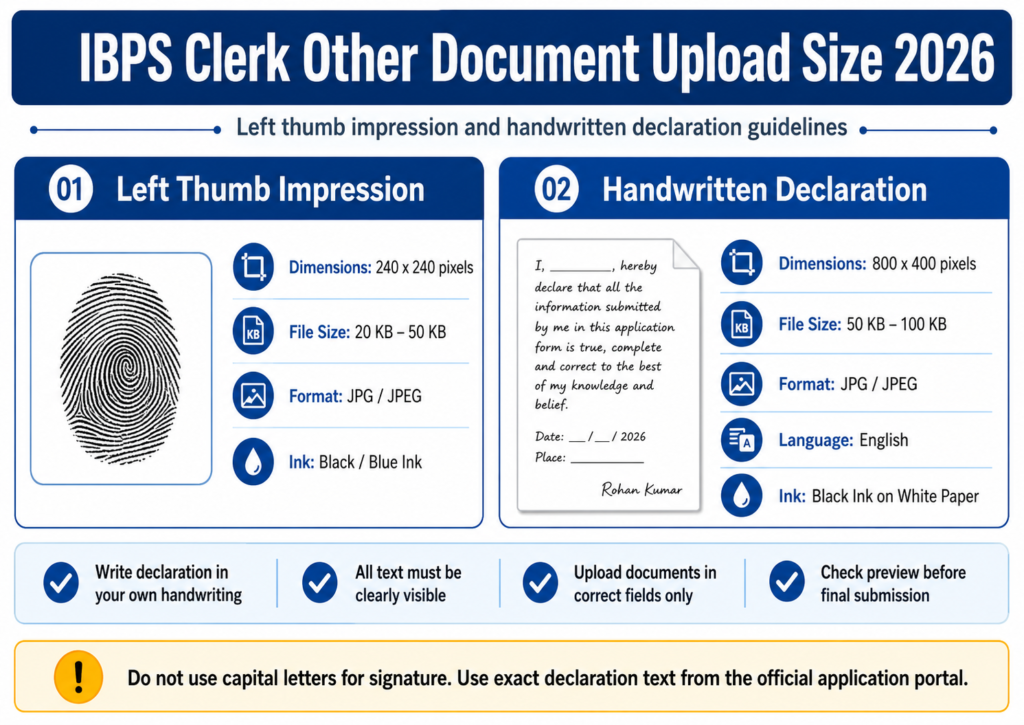
The preferred left thumb impression size is 240 × 240 pixels at approximately 200 DPI. Its file size should normally remain between 20 KB and 50 KB in JPG or JPEG format.
How to Prepare the Left Thumb Impression
- Use a clean white sheet of paper.
- Apply black or blue ink evenly to the left thumb.
- Place the thumb gently on the paper without sliding it.
- Check that the complete impression is visible and not smudged.
- Allow it to dry before scanning or photographing it.
- Crop and resize the image to the required specifications.
If the candidate cannot provide a left thumb impression, the alternative finger or toe impression permitted in the current official instructions should be used and identified correctly in the uploaded document.
IBPS Clerk Photo and Signature Size 2026: Handwritten Declaration
The handwritten declaration should preferably be 800 × 400 pixels at approximately 200 DPI. Its file size should normally be between 50 KB and 100 KB in JPG or JPEG format.
Handwritten Declaration Rules
- Write the declaration personally in your own handwriting.
- Use English on clean white paper with black ink.
- Do not write the complete declaration in capital letters.
- Write your name exactly as entered in the application form.
- Do not upload a declaration written by another person.
- Ensure every word remains readable after compression.
For a separate declaration guide, read IBPS Clerk Handwritten Declaration 2026.
How to Resize IBPS Clerk Photo and Signature Size 2026
Candidates can resize the documents using Microsoft Paint or a reliable mobile image editor. The IBPS Clerk Photo and Signature Size 2026 limits must be checked again after resizing. Always retain the original files before editing.
Resize with Microsoft Paint
- Open the original image in Microsoft Paint.
- Crop unnecessary background space.
- Select Resize and choose the pixel option.
- Enter the required width and height.
- Save the file as JPG or JPEG.
- Check the final KB size in file properties.
- Open the image and confirm that it is still clear.
Reduce KB Without Losing Clarity
- Crop blank space before compressing.
- Reduce JPG quality gradually.
- Avoid repeated screenshots of the same file.
- Do not send the final file through apps that automatically compress images.
- Check the face, signature and declaration after compression.
How to Upload IBPS Clerk Photo and Signature Size 2026
- Visit the official IBPS website.
- Open the CRP-CSA-XVI recruitment page.
- Complete new registration and log in.
- Open the document-upload section.
- Upload the photograph in the photograph field.
- Upload the signature in the signature field.
- Upload the left thumb impression and declaration separately.
- Capture the live photograph if the portal requires it.
- Preview every uploaded document.
- Re-upload any blurred, rotated or incorrectly cropped image.
- Submit the form only after the final preview.
- Download the completed application form.
IBPS Clerk Photo and Signature Size 2026: 9 Mistakes to Avoid
1. Using the Wrong Signature Size: The signature should normally be 10–20 KB, not 20–50 KB.
2. Uploading Documents in the Wrong Fields: Check the field name before selecting each file.
3. Uploading a Blurred Photograph: The face and eyes must be clearly visible.
4. Using a Selfie as the Scanned Photograph: Use a proper passport-style image for the uploaded photograph.
5. Writing the Signature in Capital Letters: Upload your normal running signature instead of block letters.
6. Uploading a Smudged Thumb Impression: Prepare a fresh impression if the ridges are unclear.
7. Using Old Declaration Wording: Copy the declaration from the current notification or application portal.
8. Compressing the Files Excessively: The file may meet the KB limit but still be rejected if it becomes unreadable.
9. Skipping the Upload Preview: Check that each image is clear, correctly oriented and uploaded in the right field.
IBPS Clerk Photo and Signature Size 2026 Checklist
- Photo is 200 × 230 pixels and 20–50 KB.
- Photo is recent, coloured and clearly visible.
- Signature is 140 × 60 pixels and 10–20 KB.
- Signature is made in black ink on white paper.
- Thumb impression is 240 × 240 pixels and 20–50 KB.
- Declaration is 800 × 400 pixels and 50–100 KB.
- All files are in JPG or JPEG format.
- Live photograph is captured successfully, if required.
- Every file is uploaded in the correct field.
- Every preview is clear and readable.
Related IBPS Clerk 2026 Guides
- IBPS Clerk Apply Online 2026
- IBPS Clerk Documents Required 2026
- IBPS Clerk Handwritten Declaration 2026
Prepare for IBPS Clerk 2026
Attempt sectional tests, full-length mock tests and detailed performance analysis on ExamTune.
IBPS Clerk Photo and Signature Size 2026: Final Advice
Prepare the IBPS Clerk Photo and Signature Size 2026 files before starting the application form. Keep the photograph at 200 × 230 pixels and 20–50 KB, and the signature at 140 × 60 pixels and 10–20 KB. The left thumb impression and handwritten declaration should also follow their prescribed dimensions and file-size limits.
Before final submission, compare every specification with the CRP-CSA-XVI notification and check the preview of each uploaded document. Clear files uploaded in the correct fields reduce the risk of form rejection and last-minute upload errors.
Frequently Asked Questions
What is the IBPS Clerk photo size 2026?
The preferred IBPS Clerk photo size is 200 × 230 pixels and 20 KB to 50 KB in JPG or JPEG format.
What is the IBPS Clerk signature size 2026?
The preferred IBPS Clerk signature size is 140 × 60 pixels and 10 KB to 20 KB in JPG or JPEG format.
What is the IBPS Clerk left thumb impression size?
The left thumb impression should preferably be 240 × 240 pixels and 20 KB to 50 KB in JPG or JPEG format.
What is the IBPS Clerk handwritten declaration size?
The handwritten declaration should preferably be 800 × 400 pixels and 50 KB to 100 KB in JPG or JPEG format.
Can I upload the IBPS Clerk signature in capital letters?
No. Candidates should upload their normal running signature and should not write it entirely in capital or block letters.
What background should be used for the IBPS Clerk photograph?
The photograph should have a plain, light-coloured and preferably white background with the candidate’s face clearly visible.
Is a live photograph required for the IBPS Clerk application?
The application portal may require candidates to capture a live photograph through a webcam or mobile phone in addition to uploading a passport-size photograph.
Which file format is accepted for IBPS Clerk photo and signature?
The photograph, signature, thumb impression and handwritten declaration are generally uploaded in JPG or JPEG format.
Can I upload a blurred photograph or signature?
No. All uploaded documents should be clear, readable, properly cropped and within the prescribed dimensions and file-size limits.
What should I do if the IBPS Clerk document upload shows an error?
Check the image dimensions, KB size and file format. Resize or compress the file without reducing clarity, and then upload it again.
Practice free quizzes, mock tests, current affairs and exam-wise preparation resources on ExamTune.