IBPS Clerk Documents Required 2026: DV & Joining List
Quick Overview
Practice free quizzes, mock tests, current affairs and exam-wise preparation resources on ExamTune.
Download PDF
Download this PDF to access the complete IBPS Clerk Documents Required checklist, including photograph, signature, thumb impression, handwritten declaration, file size, dimensions, upload specifications, and other important document guidelines for the online application process.
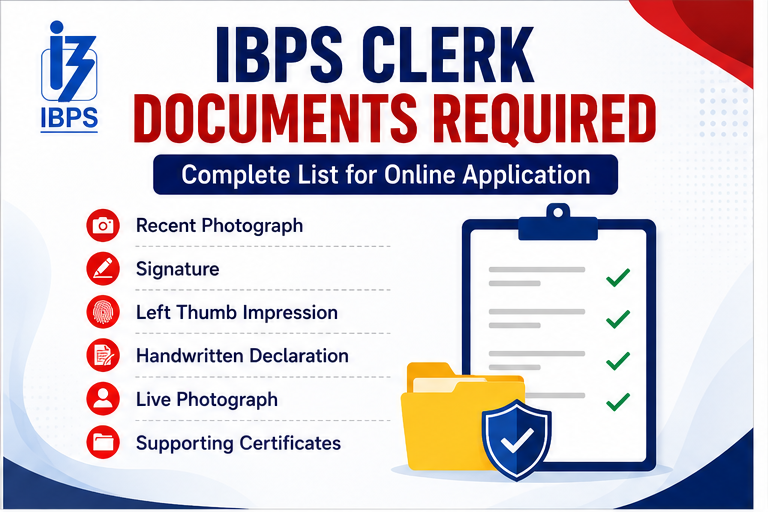
IBPS Clerk Documents Required 2026 include a scanned photograph, signature, left thumb impression, handwritten declaration, SSC/SSLC/Class 10 or equivalent certificate, and a certificate under Clause K(ix), if applicable. Candidates must also capture and upload a live photograph through a webcam or mobile phone during registration.
This guide separates documents that must be uploaded with the application from records needed for entering details, the examination and later verification. It also gives the official file size, format and preferred dimensions prescribed for CRP CSA-XVI.
IBPS Clerk Documents Required 2026: Quick Overview
| Document | Requirement | Stage |
|---|---|---|
| Recent colour photograph | Mandatory scanned upload | Online application |
| Signature | Mandatory scanned upload | Online application |
| Left thumb impression | Mandatory scanned upload | Online application |
| Handwritten declaration | Mandatory scanned upload | Online application |
| Live photograph | Captured by webcam or mobile | Online application |
| SSC/SSLC/Class 10 or equivalent certificate | Mandatory PDF upload | Online application |
| Clause K(ix) certificate | Only if applicable | Online application |
| Educational, category and identity documents | As applicable | Data entry, examination or verification |
IBPS Clerk Document Size, Dimensions and Format
| Upload | File Size | Preferred Dimensions | Format |
|---|---|---|---|
| Photograph | 20–50 KB | 200 × 230 pixels | JPG/JPEG |
| Signature | 10–20 KB | 140 × 60 pixels | JPG/JPEG |
| Left thumb impression | 20–50 KB | 240 × 240 pixels at 200 DPI; 3 cm × 3 cm | JPG/JPEG |
| Handwritten declaration | 50–100 KB | 800 × 400 pixels at 200 DPI; 10 cm × 5 cm | JPG/JPEG |
| SSC/SSLC/Class 10 certificate | Up to 500 KB | A4 document; clear and readable | |
| Clause K(ix) certificate, if applicable | Up to 500 KB | A4 document; clear and readable |
Note: Pixel dimensions are the preferred dimensions for the required quality. The file must remain within the prescribed size limit and be clearly readable after upload.
IBPS Clerk Photograph Requirements
- Use a recent passport-style colour photograph.
- The picture should be 4.5 cm × 3.5 cm with a light-coloured, preferably white, background.
- Look straight at the camera with a relaxed face.
- Ensure there is no red-eye, harsh shadow or blurred face.
- Religious headwear is permitted only when it does not cover the face.
- Do not upload a selfie, group photo, full-body photo or heavily edited image.
IBPS Clerk Signature Requirements
Sign on white paper using a black-ink pen. The signature must be made by the applicant and should match the signature used during the examination and subsequent recruitment stages.
- The signature must not be written in capital letters.
- Do not upload a typed name or digital-font signature.
- Crop the image neatly without cutting any stroke.
- Do not place the signature image in the photograph field.
IBPS Clerk Left Thumb Impression Rules
Put the left thumb impression on white paper using black or blue ink. The impression should be complete, clear and not smudged. If a candidate does not have a left thumb, the official notification provides an alternate-finger procedure; the finger used must be identified in the uploaded document.
IBPS Clerk Handwritten Declaration 2026
The declaration must be written by the candidate in English, in the candidate’s own handwriting, on white paper with black ink. It must not be written in capital letters.
“I, _______ (Name of the candidate), hereby declare that all the information submitted by me in the application form is correct, true and valid. I will present the supporting documents as and when required.”
Write your name in the blank space, copy the sentence exactly and upload only the declaration image. A declaration written by another person or in another language can make the application invalid. Accessibility exception: Candidates who cannot write may use the typed-declaration exception in the official instructions. Candidates unable to sign as well should place their left-thumb impression below the declaration and follow the prescribed upload procedure.
Live Photograph During IBPS Clerk Registration
The live photograph is additional to the scanned photograph. It must be captured through a webcam or mobile phone using the option provided in the application portal.
- Use a well-lit place and a plain background.
- Keep the camera at eye level and look directly at it.
- Do not wear a cap, mask or dark glasses.
- Make sure the face is centred and fully visible.
- Do not photograph an existing printed or digital photograph.
Class 10 Certificate Upload Rules
The SSC, SSLC, Class 10 or equivalent certificate must be scanned as a clear PDF. It is required as an online upload, not merely as a document to keep for later verification. The candidate’s name and other particulars entered in the form should match the certificate or marksheet.
Clause K(ix) Certificate: Who Should Upload It?
This certificate is required only for candidates to whom Clause K(ix) of the CRP CSA-XVI notification applies. Use the prescribed official format, obtain certification from the competent medical authority where required, convert the complete document into one readable PDF and upload it in the designated field. Candidates to whom the clause does not apply should not upload an unrelated certificate.
Details and Documents to Keep Ready Before Applying
- Active personal mobile number and email address
- Aadhaar details or another accepted identity document
- Class 10 certificate for name and date-of-birth details
- Graduation marksheets, degree or provisional certificate
- Correct marks, percentage or CGPA and the university conversion rule, if applicable
- SC/ST, OBC-NCL, EWS or PwBD certificate, where applicable
- Ex-Servicemen or DESM records, where applicable
- Payment details for the online application fee
IBPS Clerk Documents Required at the Exam Centre
The exact list printed on the call letter is final. Candidates are generally required to carry a printed call letter, the same valid photo identity proof whose details were submitted in the application, and a photocopy of that identity proof. The name on the call letter and ID proof must match. Any additional photograph or document mentioned in the call-letter instructions must also be carried.
IBPS Clerk Documents Required for Verification
CRP CSA does not include an interview. After the Main examination, participating banks may verify eligibility, identity, category and local-language records before joining or provisional appointment. Keep originals and self-attested photocopies ready, as applicable:
- System-generated online application form and e-receipt
- Preliminary and Main examination call letters
- Valid photo identity proof
- Class 10 certificate for date-of-birth proof
- Graduation degree or provisional certificate and all marksheets
- SC/ST certificate in the prescribed format
- OBC-NCL certificate and declaration in the prescribed Central Government format
- EWS Income and Asset Certificate for the relevant period
- PwBD certificate, UDID or supporting document as prescribed
- Ex-Servicemen/DESM documents, if applicable
- Evidence of proficiency in the opted State/UT’s specified local language, where required
- Name-change proof such as marriage certificate, gazette notification or other prescribed record, if applicable
How to Scan and Resize IBPS Clerk Documents
- Place the paper flat in good, even light.
- Scan the complete document without shadows, fingers or background objects.
- Crop only the unnecessary outer area; do not cut text, seals or signatures.
- Resize the image to the preferred pixel dimensions.
- Compress it only enough to reach the required KB range.
- Open the saved file and zoom in to confirm that it remains readable.
- Use JPG/JPEG for image uploads and PDF for certificate uploads.
How to Upload IBPS Clerk Documents: 12 Steps
- Create separate, clearly named files for every required upload.
- Check each file’s type, size and preferred dimensions.
- Open the CRP CSA-XVI application page through the official IBPS website.
- Register and note the provisional registration number and password.
- Open the photograph upload field and select only the scanned photograph.
- Upload the signature in the signature field.
- Upload the left thumb impression in its designated field.
- Upload the handwritten declaration and verify that the complete sentence is visible.
- Upload the Class 10 certificate and the Clause K(ix) certificate, if applicable, as PDFs.
- Capture the live photograph through the portal’s webcam or mobile option.
- Check every preview to ensure that no file is blurred, rotated, cropped or interchanged.
- Use “Save and Next,” verify the complete form and click “Complete Registration” only after all details and uploads are correct.
What to Do If an IBPS Clerk Document Is Not Uploading
- Confirm that the file is within the minimum and maximum size.
- Check that an image is JPG/JPEG and a certificate is PDF.
- Rename the file using simple English letters and numbers.
- Remove password protection from a PDF.
- Re-scan a corrupted, blank or unreadable file.
- Use a supported, updated browser and a stable internet connection.
- Clear the browser cache or try again after logging in afresh.
Can IBPS Clerk Uploaded Documents Be Changed?
Before completing registration, candidates can use “Save and Next” to review and modify the application. Once “Complete Registration” is clicked, ordinary editing is not available. If IBPS opens the separate correction window, only permitted fields can be changed, the corrected form can be submitted only once, and the prescribed correction fee applies. Therefore, do not rely on the correction window for an avoidable upload mistake.
Common IBPS Clerk Document Upload Mistakes
- Uploading the photograph and signature in opposite fields
- Using a signature written in capital letters
- Typing the handwritten declaration without meeting the official accessibility exception, or changing its wording
- Uploading the Class 10 certificate as an image instead of the prescribed PDF
- Using files outside the permitted size range
- Submitting a smudged thumb impression or cropped declaration
- Capturing a printed picture instead of a genuine live photograph
- Entering a name or date of birth that does not match official records
- Assuming category certificates are uploaded at the initial stage when only their details are requested
- Clicking “Complete Registration” without checking every preview
Final IBPS Clerk Document Checklist
- Photograph: JPG/JPEG, 20–50 KB, recent and clear
- Signature: JPG/JPEG, 10–20 KB, black ink and not in capital letters
- Left thumb impression: JPG/JPEG, 20–50 KB, complete and unsmudged
- Handwritten declaration: JPG/JPEG, 50–100 KB, exact English text in the candidate’s handwriting unless the official typed-declaration accessibility exception applies
- Class 10 certificate: readable PDF up to 500 KB
- Clause K(ix) certificate: readable PDF up to 500 KB, only if applicable
- Live photograph: properly captured through the registration portal
- All personal and academic entries match the supporting records
- Every upload appears correctly in its preview
- Application form and e-receipt are saved after successful submission
Related IBPS Clerk Articles
- IBPS Clerk Apply Online 2026
- IBPS Clerk Handwritten Declaration 2026
- IBPS Clerk Notification 2026
- IBPS Clerk Exam Date 2026
- IBPS Clerk Syllabus and Exam Pattern 2026
Official External Links
Popular Online Live Classes
Frequently Asked Questions
Which documents are required for IBPS Clerk document verification?
Candidates generally need the submitted application form, DV or joining letter, date-of-birth proof, valid photo ID, graduation marksheets and degree certificate, local-language proof, photographs and applicable category certificates.
Are original documents compulsory for IBPS Clerk DV?
Yes. Candidates should carry the required original documents along with self-attested photocopies. Scanned copies or photographs on a mobile phone may not be accepted in place of originals.
How many photocopy sets should I carry for document verification?
Follow the instructions issued by the allotted bank. If the number is not specified, carrying at least two properly arranged sets of self-attested photocopies is advisable.
Is the Class 12 certificate required for IBPS Clerk DV?
The participating bank may ask for Class 10, Class 12 and graduation records during verification. Therefore, candidates should carry their Class 12 marksheet and certificate even if graduation is the primary educational qualification.
Can I submit a provisional graduation certificate at IBPS Clerk DV?
A university-issued provisional certificate may be accepted if it proves that the candidate completed graduation within the prescribed eligibility date. Carry all semester or year-wise marksheets as supporting documents.
Is local-language proof required for IBPS Clerk joining?
Yes, local-language proficiency is relevant to the State or UT selected by the candidate. Candidates may submit an accepted Class 10 or higher certificate showing the opted language or appear for the Local Language Proficiency Test, as applicable.
Is a computer certificate compulsory for IBPS Clerk document verification?
Candidates must satisfy the computer-literacy requirement mentioned in the notification. Proof may include a computer certificate, diploma or school/college marksheet showing Computer or IT as a subject, subject to official instructions.
Which certificate is required for OBC candidates?
OBC candidates claiming reservation should carry a valid OBC Non-Creamy Layer certificate in the prescribed Government of India format. The community should be included in the applicable Central List, and the certificate must meet the required issue-date conditions.
Do employed candidates need an NOC for IBPS Clerk joining?
Candidates working in Government departments, PSUs or organisations covered by the joining instructions may need a No Objection Certificate or relieving document from their employer.
What happens if a document is missing during IBPS Clerk DV?
A missing, invalid or incorrectly formatted certificate may delay verification or affect candidature. Candidates should immediately contact the allotted bank and follow its written instructions instead of assuming that an affidavit or undertaking will be accepted.
About the Author

Practice free quizzes, mock tests, current affairs and exam-wise preparation resources on ExamTune.