
IBPS Clerk Registration Email Not Received? 7 Critical Fixes
Quick Overview
Practice free quizzes, mock tests, current affairs and exam-wise preparation resources on ExamTune.
Last Updated: August 4, 2026
Source check: This guide has been reviewed against the official IBPS CRP CSA-XVI application instructions, registration portal and Candidate Grievance Redressal System.
If your IBPS Clerk Registration Email Not Received problem appears after creating or submitting the online application, do not immediately fill out a duplicate form. First check the Spam folder, SMS, provisional registration number, candidate login, payment status, application printout and e-receipt.
After a successful new registration, the IBPS system generates a provisional registration number and password on the screen. The same credentials are also sent through email and SMS to the details entered by the candidate.
Quick Answer
If the email is missing but you received the registration number by SMS, can log in, and can download the completed application form and e-receipt, do not submit another application only because the email did not arrive. If neither email nor SMS arrived, no valid registration number exists, and no application reprint or e-receipt can be generated, the registration may be incomplete.
What Does “IBPS Clerk Registration Email Not Received” Mean?
The IBPS Clerk Registration Email Not Received issue does not automatically mean that the form has failed. Email delivery can be delayed or filtered, while the registration may still exist in the portal. The candidate should verify the application through the official login instead of depending only on the inbox.
The most reliable checks are whether a proper provisional registration number was generated, whether the candidate can log in, whether the submitted application can be printed, and whether a payment e-receipt is available.
Why Has the IBPS Clerk Registration Email Not Arrived?
Common reasons include:
- The message was moved to Spam, Junk, Promotions or Updates.
- The candidate entered an incorrect email address.
- The email provider delayed or blocked an automated message.
- Heavy portal traffic delayed delivery.
- The internet disconnected before registration was saved.
- The application or payment process remained incomplete.
- A work, college or company email account blocked bulk messages.
Email delivery alone should not be used as the final test. Verify the application directly through the official IBPS Clerk application portal.
IBPS Clerk Registration Email Not Received: Perform These 7 Checks
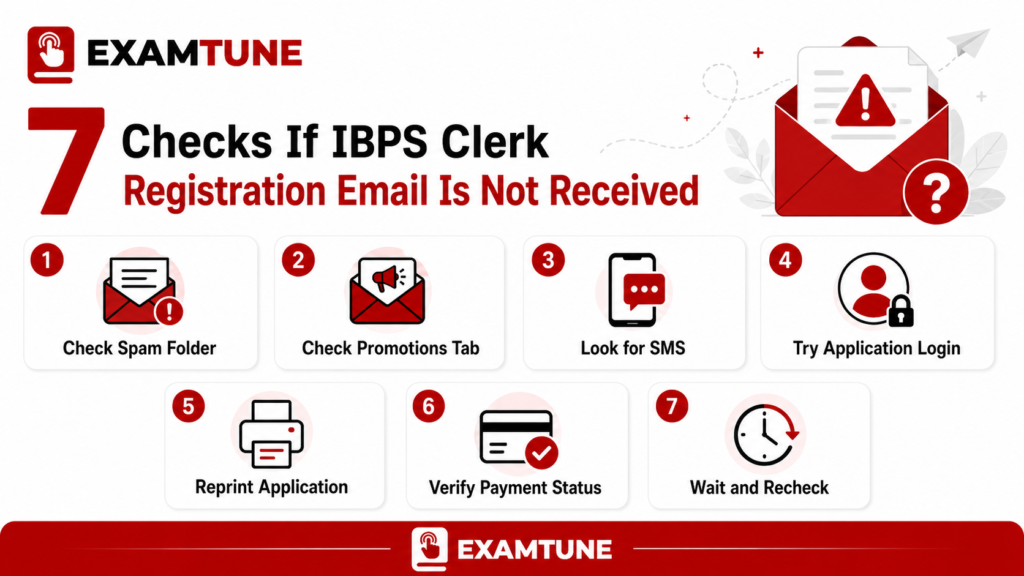
1. Check Spam, Junk, Promotions and All Mail
Open the same email account entered in the application and check Spam, Junk, Promotions, Updates, All Mail and Trash. Search for IBPS, Registration, Provisional Registration, CRP CSA and Password.
2. Search the Registered Mobile Number for an IBPS SMS
Open the Messages application and search for “IBPS.” If the provisional registration number and password arrived by SMS, take a screenshot and store the details safely.
3. Check Screenshots, Notes, Downloads and Browser History
The provisional registration number is displayed on the screen after new registration. Check screenshots, saved notes, copied messages, browser history and downloaded PDFs for the number.
4. Try the Registered Candidate Login
Use the registration number and password to log in. Verify whether your name, saved application details, uploaded documents, payment status and application print option are visible.
5. Use the Application Reprint Option
A downloadable application printout is strong evidence that the registration record exists. If your registration number is blank or displayed as zero, read the related guide on the IBPS Clerk blank registration number before creating another application.
6. Verify the Payment Status and E-Receipt
A bank debit by itself does not prove successful submission. After a successful online transaction, an e-receipt should be generated. Save both the e-receipt and the system-generated application form.
7. Confirm Whether Both Email and SMS Are Missing
If only the email is missing but the SMS, login, application print and e-receipt are available, preserve those records. If both email and SMS are missing and the portal does not show a valid application record, treat the matter as urgent and verify it before the closing date.
Best proof to save: provisional registration number, password, completed application PDF, successful payment status, e-receipt, SMS screenshot and bank transaction reference.
IBPS Clerk Email Not Received but SMS Received
If the email did not arrive but the SMS contains the registration number and password, use those details to log in. Then:
- Download the completed application PDF.
- Download the payment e-receipt.
- Check that the application status is complete.
- Save the SMS screenshot.
- Keep the bank or UPI transaction reference.
- Store the registration number and password in a secure location.
Do not reapply only because the email is missing. First verify the login, application printout and e-receipt.
What If Neither the Email nor SMS Was Received?
When both acknowledgements are missing, check whether the registration number was displayed on the screen or saved anywhere. Follow this order:
- Check screenshots, notes and browser history.
- Check whether money was deducted.
- Look for a valid provisional registration number.
- Try candidate login if the number is available.
- Check the application reprint option.
- Check whether an e-receipt is available.
- Use Forgot Password only when the registration number is available.
- Submit an official grievance if the status remains unclear.
The official instructions state that candidates who receive neither the email nor SMS acknowledgement may consider that the online application has not been successfully registered. Therefore, do not leave this issue unresolved.
What If You Entered the Wrong Email Address?
Before Complete Registration
If the application has not been finally submitted, use Save and Next, Back or Edit to correct the email address. Verify every letter before completing registration.
After Complete Registration
The official application instructions state that the registered email ID cannot be edited after submission and is also excluded from the later edit window. If a wrong email has already been submitted:
- Keep the registered mobile number active.
- Save the registration number and password.
- Download the completed application and e-receipt.
- Submit a grievance and request official guidance.
- Check the official IBPS website regularly.
- Do not rely only on email for future recruitment updates.
Submitting a grievance does not guarantee that the email address will be changed. It creates an official record of the issue and allows IBPS to provide case-specific guidance.
Should You Submit a New IBPS Clerk Application?
Do not create a duplicate application until the original status has been checked.
| Situation | Recommended Action |
|---|---|
| Email missing, SMS received | Log in and save the application form and e-receipt. Do not immediately reapply. |
| Registration number available and login works | Verify final submission and payment status. |
| Payment successful and e-receipt generated | Save all records; email delivery may be the only issue. |
| Registration number blank or zero | Follow the official blank/zero registration guidance and re-register when required. |
| No email, SMS or registration number | Check the portal and lodge a grievance promptly. |
| Money deducted but no e-receipt | Do not assume success; verify the transaction and application status. |
| Application reprint unavailable | The form may be incomplete; seek official guidance before the deadline. |
IBPS Clerk Registration Email Not Received: Practical 24-Hour Action Plan
This 24-hour plan is a practical verification sequence, not an official mandatory waiting period. Do not delay beyond the application deadline.
- First 30 minutes: Check Spam, Junk, Promotions, Updates, All Mail and SMS.
- Within two hours: Try candidate login and check the application PDF, payment status and e-receipt.
- Within two to 12 hours: Check the inbox again and try another updated browser or device.
- Within 12 to 24 hours: Save screenshots, the transaction reference, error text and all registration details.
- When the status remains unclear: Lodge an official IBPS grievance without waiting until the closing date.
Current IBPS Clerk 2026 Registration Dates
| Event | Date |
|---|---|
| Online registration starts | August 1, 2026 |
| Registration and fee payment close | August 21, 2026 |
| Last date to print the application | September 5, 2026 |
Resolve registration-email and payment issues well before the closing date because heavy traffic near the deadline can make verification more difficult.
How to Submit an Official IBPS Grievance
Use the IBPS Candidate Grievance Redressal System. A valid accessible email address is required to register a complaint, and each complaint receives a unique number for tracking.
Suggested Complaint Subject
IBPS Clerk Registration Confirmation Email Not Received
Details to Include
- Candidate’s full name
- Recruitment name: CRP CSA-XVI
- Registration number, if available
- Mobile number used in the form
- Email address entered in the form
- Date and approximate time of registration
- Payment status and transaction reference
- Browser and operating system
- Exact error message
- Relevant screenshots
Sample Grievance Message
Subject: IBPS Clerk Registration Confirmation Email Not Received
I completed my IBPS Clerk online registration, but I have not received the registration confirmation email. Kindly verify whether my application has been registered successfully.
My registration number, registered mobile number, email address, payment details and screenshots are provided for verification. Please guide me regarding the next steps.
IBPS Helpline Numbers and Working Hours
- Toll-free: 1800 222 366
- Alternative: 1800 103 4566
- Working hours: 9:30 AM to 6:00 PM, except Saturdays, Sundays and applicable bank holidays in Maharashtra.
Verify contact details on the official IBPS contact page before calling.
Final Application Status Checklist
- Valid provisional registration number
- Registration password
- SMS acknowledgement, where received
- Successful candidate login
- Completed application PDF
- Successful payment status
- Payment e-receipt
- Final submitted or completed status
A downloadable application form and e-receipt are among the most important records of successful submission. An email alone should not be treated as the only proof.
Conclusion
If the IBPS Clerk Registration Email Not Received issue occurs, first verify Spam, SMS, the registration number, candidate login, application reprint, payment status and e-receipt. Do not create a duplicate application only because an email is delayed.
If neither email nor SMS arrived and no valid registration record can be found, resolve the issue before the closing date. Candidates with a wrong email ID after final submission should keep the registered mobile number active, save all application records and submit an official grievance.
Related ExamTune Guides
Official Sources
Frequently Asked Questions
Is an IBPS registration email found in the Spam folder valid?
Yes. Automated emails may be moved to the Spam, Junk or Bulk folder by your email provider. Verify the registration number and other details through the official IBPS application portal before using them.
I received an SMS but no email. Is my form saved?
Use the registration number and password received by SMS to log in. If you can download the completed application form and e-receipt, save them as proof of successful submission.
Can I change the wrong email address during the correction window?
The registered email address may be treated as a non-editable field after final submission. Check the current official notification and submit an IBPS grievance for guidance.
Should I wait for 24 hours before taking action?
No. Immediately check your SMS, application login, reprint option and payment status. If the issue remains unresolved after a reasonable waiting period, submit an official grievance.
What should I do if I forgot my registration number?
Check your registered email account, SMS inbox, screenshot folder, browser history and downloaded files. If you still cannot find the registration number, use the official IBPS grievance portal.
Payment was deducted, but the email did not arrive. Is the form successful?
Not necessarily. Check whether the completed application form and payment e-receipt were generated. Payment deduction alone is not final proof of successful registration.
Neither the email nor SMS was received. What should I do?
Check whether the registration number was displayed or saved during registration. Try the login and application reprint options. If no application record is available, submit an official grievance before the closing date.
Will my application be rejected because of a wrong email address?
A wrong email address does not automatically mean that the application will be rejected. However, you may miss important communication. Report the issue and regularly check the official IBPS website.
Can I fill out another IBPS Clerk application form?
First verify whether the original application was saved and paid successfully. Do not submit a duplicate application if the first form is already complete. Re-register only when the original registration failed or IBPS advises you to do so.
What is the strongest proof of successful IBPS Clerk registration?
A valid registration number, successful login, completed application PDF, successful payment status and e-receipt together provide strong proof of successful registration.
Practice free quizzes, mock tests, current affairs and exam-wise preparation resources on ExamTune.