
IBPS Clerk Registration Number or Password Not Received 2026: 7 Quick Ways to Recover Login Details
Quick Overview
Practice free quizzes, mock tests, current affairs and exam-wise preparation resources on ExamTune.
What Does IBPS Clerk Registration Number or Password Not Received 2026 Mean?
IBPS Clerk Registration Number or Password Not Received 2026 means that a candidate cannot find one or both login credentials after starting or completing the application. The registration number works as the candidate login ID, while the password is required to reopen the form, check payment status, print the application, or access later updates. The absence of an SMS or email does not always mean that the application failed. The credentials may have been sent to the registered contact details but moved to another folder. Sometimes the candidate closes the confirmation page without saving the details.Why IBPS Clerk Registration Number or Password Not Received 2026 Happens
There can be several reasons behind IBPS Clerk Registration Number or Password Not Received 2026. The issue may be caused by a network delay, email filtering, incorrect contact details, full mailbox storage, browser problems, or incomplete registration.| Possible Reason | What It Means | Recommended Action |
|---|---|---|
| Email moved to Spam or Promotions | The automatic email was filtered. | Search all folders using IBPS-related keywords. |
| SMS delay | The mobile network or spam filter delayed the message. | Restart the phone and check blocked messages. |
| Incorrect email or mobile number | The credentials may have gone to the details typed in the form. | Check screenshots, saved forms, and browser history. |
| Incomplete registration | The registration number may not have been generated. | Verify whether the confirmation page appeared. |
| Heavy portal traffic | Pages and messages may load slowly during peak hours. | Try again later using a stable internet connection. |
7 Quick Ways to Solve IBPS Clerk Registration Number or Password Not Received 2026
1. Search Every Folder in the Registered Email Account
The first solution for IBPS Clerk Registration Number or Password Not Received 2026 is to search the complete email account linked with the application. Open Inbox, Spam, Junk, Promotions, Updates, Social, All Mail, and Trash folders. Search using terms such as “IBPS,” “registration number,” “password,” “application,” and “CRP CSA.” Check whether your mailbox storage is full. If it is full, delete unnecessary files, refresh the inbox, and search again. Candidates using multiple email accounts should confirm which email address was entered in the form.2. Check SMS Spam, Blocked Messages, and Archived Conversations
If IBPS Clerk Registration Number or Password Not Received 2026 continues after checking email, inspect the SMS application carefully. Some phones automatically move machine-generated messages into spam, blocked, archived, or promotional folders. If your phone has two SIM cards, check both message inboxes. Restart the device and make sure the registered SIM is active, has network coverage, and can receive service messages.3. Review Screenshots, Downloads, and Saved Application Files
Many candidates take a screenshot of the registration page but forget where it was saved. To resolve IBPS Clerk Registration Number or Password Not Received 2026, search the Screenshots, Downloads, Documents, Gallery, WhatsApp, and Telegram folders on your device. Also check browser download history for a saved PDF, draft application, confirmation page, or e-receipt. The registration number may be printed near the top of the application summary.4. Check Payment Receipt and Transaction Details
If the application fee has been paid, IBPS Clerk Registration Number or Password Not Received 2026 may be resolved by checking the payment confirmation email, e-receipt, bank statement, or payment gateway message. Save the payment date, amount, and transaction reference. A payment transaction ID is usually different from the IBPS registration number. It should be kept as supporting evidence but should not be entered as the candidate login ID unless the portal specifically asks for it.5. Use the Forgot Password Option
The most direct recovery method for IBPS Clerk Registration Number or Password Not Received 2026 is the “Forgot Password” option available on the relevant candidate login page. This method is useful when the registration number is available but the password is missing. Enter the registration number and the same mobile number or email address used during registration. Type the details manually, complete the security code, and submit the request. Check both SMS and email after submitting.6. Try Another Browser or Device
Sometimes IBPS Clerk Registration Number or Password Not Received 2026 appears to be a credential issue, but the actual problem is caused by the browser. Clear cache and cookies, disable automatic translation, allow pop-ups, and use an updated version of Chrome, Edge, or Firefox. Try opening the portal on a desktop or laptop. Avoid using several login tabs at the same time, and do not refresh the page repeatedly while a request is being processed.7. Submit an Official Grievance
If all recovery methods fail, the final solution for IBPS Clerk Registration Number or Password Not Received 2026 is to submit a complaint through the official IBPS grievance system. Explain the issue clearly and provide accurate details that can help identify the application. Mention your full name, date of birth, registered mobile number, registered email address, recruitment name, approximate registration date, and payment reference. Attach a screenshot of the error if available.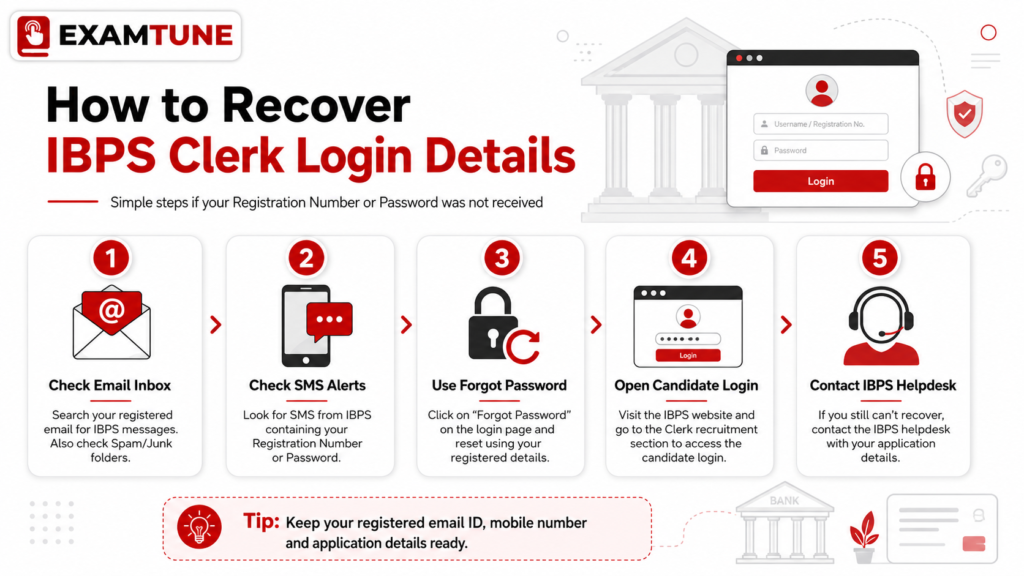
How to Use Forgot Password for IBPS Clerk Registration Number or Password Not Received 2026
Follow these steps when the registration number is available but the password has not been received:- Open the official IBPS website.
- Go to the relevant CRP Customer Service Associate recruitment page.
- Open the active online application or candidate login link.
- Click the “Forgot Password” option.
- Enter the correct registration number.
- Enter the registered mobile number or email address.
- Fill in the security code exactly as displayed.
- Submit the request and check both SMS and email.
How to Find the Registration Number When Both Details Are Missing
If both credentials are missing, IBPS Clerk Registration Number or Password Not Received 2026 requires a wider search. Start with your email and SMS, then check screenshots, downloaded forms, payment confirmations, browser history, notes, and messaging apps. Search your email by date and use terms such as “IBPS,” “Customer Service Associate,” “registration,” and “application.” If the registration number is still unavailable, raise an official grievance and provide all available application and payment information.What to Include in an IBPS Complaint
A complete complaint can help resolve IBPS Clerk Registration Number or Password Not Received 2026 faster. Keep the message short, factual, and easy to understand.- Candidate’s full name as entered in the form
- Date of birth
- Registered mobile number
- Registered email address
- Recruitment name
- Approximate date and time of registration
- Payment status and transaction reference, if applicable
- Screenshot of the error message
- A clear request to recover the registration number or password
Mistakes to Avoid During Credential Recovery
While fixing IBPS Clerk Registration Number or Password Not Received 2026, do not make repeated random login attempts. Repeated incorrect entries may create temporary access problems and make it difficult to understand whether the registration number or password is incorrect.- Do not create a duplicate application without checking the first registration.
- Do not use unofficial websites promising instant credential recovery.
- Do not share login details in Telegram, WhatsApp, or social media groups.
- Do not confuse the transaction ID with the registration number.
- Do not enter a new email or mobile number in the recovery form.
- Do not wait until the final date to contact support.
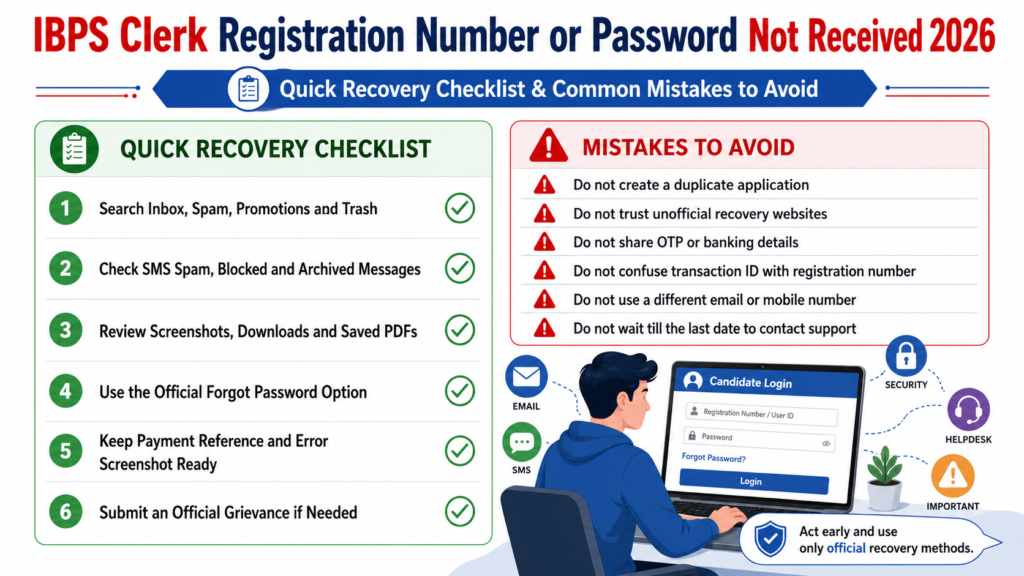
Use this quick IBPS Clerk login recovery checklist and avoid common mistakes while recovering your registration number or password.
How to Prevent IBPS Clerk Registration Number or Password Not Received 2026 in Future
After registration, take a clear screenshot of the confirmation page, download the submitted form and e-receipt, and save the credentials in two secure places. Keep the registered mobile number active until the recruitment process ends. These simple steps can prevent IBPS Clerk Registration Number or Password Not Received 2026 from becoming a last-minute problem.Quick Recovery Checklist
| Recovery Step | Status |
|---|---|
| Searched Inbox, Spam, Promotions, and Trash | Yes / No |
| Checked SMS spam, blocked, and archived folders | Yes / No |
| Checked screenshots, downloads, and saved PDFs | Yes / No |
| Used the official Forgot Password option | Yes / No |
| Saved payment reference and error screenshot | Yes / No |
| Submitted an official grievance if required | Yes / No |
Conclusion
IBPS Clerk Registration Number or Password Not Received 2026 can usually be solved by checking all email and SMS folders, reviewing saved files, using the Forgot Password option, and submitting an official grievance when necessary. Candidates should act early, use only registered contact details, and keep payment proof ready. Once IBPS Clerk Registration Number or Password Not Received 2026 is resolved, save the recovered credentials securely and download the application form. This will help prevent login problems during later stages of the recruitment process.Prepare for IBPS Clerk with ExamTune
Practice topic-wise tests, mock exams, and updated preparation material. Attempt Free Mock TestPrepare for IBPS Clerk with ExamTune
Boost your preparation with India’s trusted banking exam platform.-
- ✔ Live Interactive Classes
- ✔ Recorded Video Lectures
- ✔ Latest PDF Notes
- ✔ Section-wise Mock Tests
- ✔ Previous Year Papers
- ✔ Daily Practice Questions
- ✔ Expert Doubt Support
- ✔ Interview & Document Verification Guidance
Related IBPS Clerk 2026 Guides
Frequently Asked Questions
What should I do if my IBPS Clerk Registration Number or Password is not received in 2026?
Check your registered email inbox, spam folder and SMS messages. IBPS normally sends the registration number and password after successful online registration.
How can I recover my IBPS Clerk password?
Open the relevant IBPS Clerk candidate login page and click on the “Forgot Password” option. Follow the instructions to retrieve or reset your password during the active login period.
How can I find my lost IBPS Clerk registration number?
Search your registered email and mobile messages for the confirmation sent by IBPS. The registration number is generally provided through both email and SMS after successful registration.
Why have I not received my IBPS Clerk login credentials?
The message may be delayed because of network issues, an incorrect email address or mobile number, a full inbox, or an incomplete registration. Also check whether the application was successfully submitted.
Can I recover IBPS Clerk login details without my registered mobile number?
First check the email address used in the application form. When recovery through email or mobile is unavailable, candidates should submit a complaint through the IBPS Candidate Grievance Redressal System.
Can I use my date of birth instead of the IBPS Clerk password?
Use your date of birth only when the relevant IBPS login page specifically provides it as a login option. For the application portal, candidates should normally use their registration number and password.
Why does the IBPS Clerk portal show invalid login credentials
This error may appear because of an incorrect registration number, password typing error, extra spaces, use of the wrong recruitment portal or closure of the relevant login period.
Where can I find the Forgot Password option for IBPS Clerk 2026?
The “Forgot Password” option is generally displayed below the password field on the official login page for already registered candidates.
Whom should I contact if IBPS Clerk Registration Number or Password is not received?
Candidates can contact the IBPS helpline at 1800 222 366 or 1800 103 4566. The official contact page currently lists support hours as 9:30 AM to 6:00 PM, excluding Saturdays, Sundays and applicable Maharashtra bank holidays.
Is the IBPS Clerk registration number required after submitting the form?
Yes. Keep your registration number and password safely because they may be required to print the application, download call letters, check results or access other candidate services.
Practice free quizzes, mock tests, current affairs and exam-wise preparation resources on ExamTune.