
IBPS Clerk Fee Payment Failed 2026: Double Payment, Refund & E-Receipt
Quick Overview
Practice free quizzes, mock tests, current affairs and exam-wise preparation resources on ExamTune.
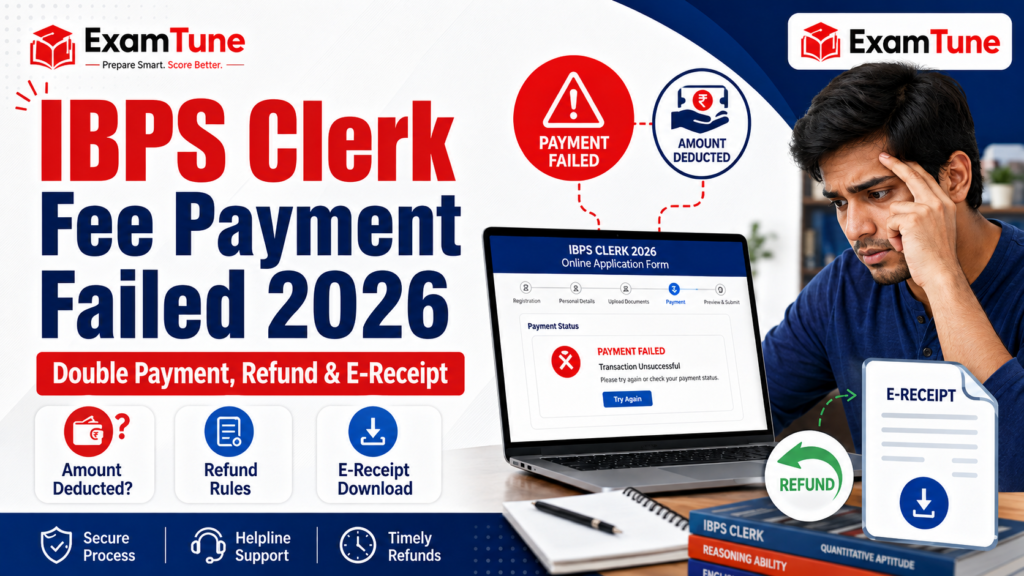
IBPS Clerk Fee Payment Failed 2026 is one of the most common problems candidates may face while completing the online application form. A transaction may remain pending, the amount may be deducted without confirmation, the e-receipt may not be generated, or the fee may be charged twice. Since the IBPS Clerk application is treated as complete only after successful online fee payment, candidates should verify the payment status carefully and take action before the closing date. This detailed guide explains what to do when IBPS Clerk Fee Payment Failed 2026 appears on the portal, how to handle a deducted amount, how to check the application status, what to do after double payment, and how to download the official e-receipt. Candidates should rely on the status shown in the IBPS application portal and preserve every payment-related record for future reference.
IBPS Clerk Fee Payment Failed 2026: Quick Overview
| Particular | Details |
|---|---|
| Recruitment | IBPS Clerk / Customer Service Associate, CRP CSA-XVI |
| Online Registration | 1 August 2026 to 21 August 2026 |
| Fee Payment Mode | Online only |
| SC, ST, PwBD, ESM and DESM Fee | ₹175 inclusive of GST |
| Fee for Other Candidates | ₹850 inclusive of GST |
| Successful Payment Proof | System-generated e-receipt |
| Official Complaint Portal | IBPS Candidate Grievance Redressal System |
| Official Website | ibps.in |
What Does IBPS Clerk Fee Payment Failed 2026 Mean?
IBPS Clerk Fee Payment Failed 2026 means the payment gateway or application portal has not confirmed the transaction successfully. This may happen even when the candidate has entered the correct card, UPI or internet banking details. A weak internet connection, payment gateway timeout, delayed bank response, incorrect OTP, insufficient balance, transaction limit, server load or accidental use of the Back or Refresh button can interrupt the payment process. A bank debit message alone does not always prove that the IBPS application fee has been accepted. The most important confirmation is the payment status inside the candidate login and the availability of the system-generated e-receipt. When the transaction is completed successfully, an e-receipt is generated. If the e-receipt cannot be generated, the transaction may not have been successful.
IBPS Clerk Fee Payment Failed 2026 but Amount Deducted
If the amount is deducted but the portal shows payment failed, do not immediately press Back, Refresh or repeatedly initiate a new transaction. First, save the bank debit message, UPI reference number, transaction ID, date, time and amount. Close the payment page safely and log in again using the provisional registration number and password. After login, check whether the portal allows you to download the e-receipt or print the completed application form. If the e-receipt is available and the application status is complete, the payment has normally been recorded. Download and save the e-receipt immediately. If the portal still shows unpaid or incomplete and no e-receipt is generated, the official IBPS instructions advise candidates to log in again and pay the application fee online. Before making another payment, check whether the first transaction is still marked as pending by your bank or UPI application. This can reduce the possibility of an avoidable duplicate debit. However, candidates should not wait until the final hours of registration. Anyone facing IBPS Clerk Fee Payment Failed 2026 should leave enough time to retry the payment and contact IBPS if required.
Steps to Follow When Money Is Deducted
- Take a screenshot of the debit confirmation.
- Note the transaction ID, UPI reference or bank reference number.
- Do not use the browser Back or Refresh button.
- Log in again through the official IBPS application portal.
- Check the payment status and e-receipt option.
- Download the application form if the payment is successful.
- If the portal still shows unsuccessful payment, retry before the deadline.
- Raise an official complaint if the issue remains unresolved.
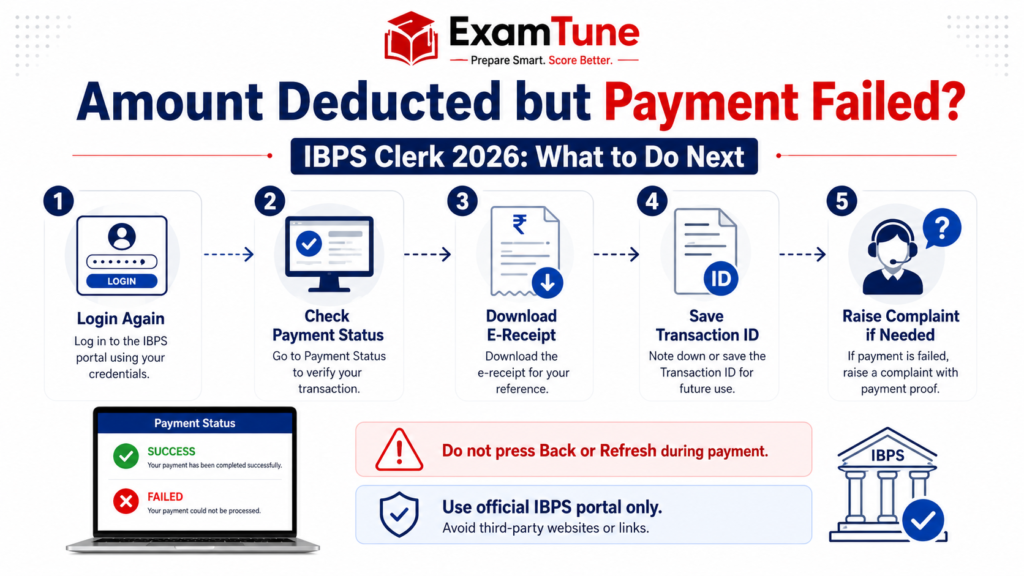
Amount deducted but IBPS Clerk payment failed? Login again, check payment status, download the e-receipt, save the transaction ID and raise a complaint if required.
How to Check IBPS Clerk Payment Status
To verify IBPS Clerk Fee Payment Failed 2026, candidates should use only the official IBPS candidate login. Open the CRP CSA-XVI application page and enter the provisional registration number, password and security code. The candidate login facility can be used for online payment, e-receipt printing and application-form printing. Check whether the dashboard displays a successful payment message. Next, try to open or download the e-receipt. Also download the final application form and confirm that the application is complete. Keep both documents safely because candidates are required to retain the e-receipt and application printout.
Signs That the Payment Is Successful
- The portal displays a successful or completed payment status.
- A system-generated e-receipt is available.
- The final application form can be downloaded or printed.
- The correct fee amount appears on the receipt.
- The application is no longer shown as incomplete due to unpaid fees.
Signs That the Payment May Have Failed
- No e-receipt is generated.
- The candidate login still asks for fee payment.
- The application status remains incomplete.
- The payment gateway displays failed, cancelled or timed-out status.
- The final application print does not show successful fee submission.
These checks are more reliable than depending only on an SMS from the bank. Candidates should resolve IBPS Clerk Fee Payment Failed 2026 according to the status displayed on the official IBPS portal.
IBPS Clerk Double Payment and Refund Process
Double payment may happen when a candidate refreshes the page, clicks the payment button more than once, repeats the transaction while the first transaction is pending, or receives a delayed response from the payment gateway. The official instructions specifically warn candidates not to press the Back or Refresh button after submitting payment information because this may cause a double charge. If IBPS Clerk Fee Payment Failed 2026 results in two debits, first confirm which transaction is linked to the successful application. Download the e-receipt and match its transaction details with the entries shown in the bank statement or UPI history. Keep screenshots of both debits and the successful e-receipt. Do not initiate a third payment when the application has already been completed successfully. The official notification states that the normal application fee, once paid for a registered application, is not refundable and is not held in reserve for another examination. However, the official instructions do not provide a guaranteed automatic refund timeline specifically for an accidental duplicate payment. Therefore, candidates should not depend on unofficial claims promising a refund within a fixed number of days.
What to Do After Double Payment
- Do not make any additional payment if the application is complete.
- Download the successful e-receipt and final application form.
- Collect both transaction IDs and bank reference numbers.
- Save screenshots or statements showing both debits.
- Check whether the unsuccessful or pending transaction is reversed by the bank.
- Contact the bank or payment service provider using the transaction reference.
- Register a complaint on the IBPS grievance portal if the issue remains unresolved.
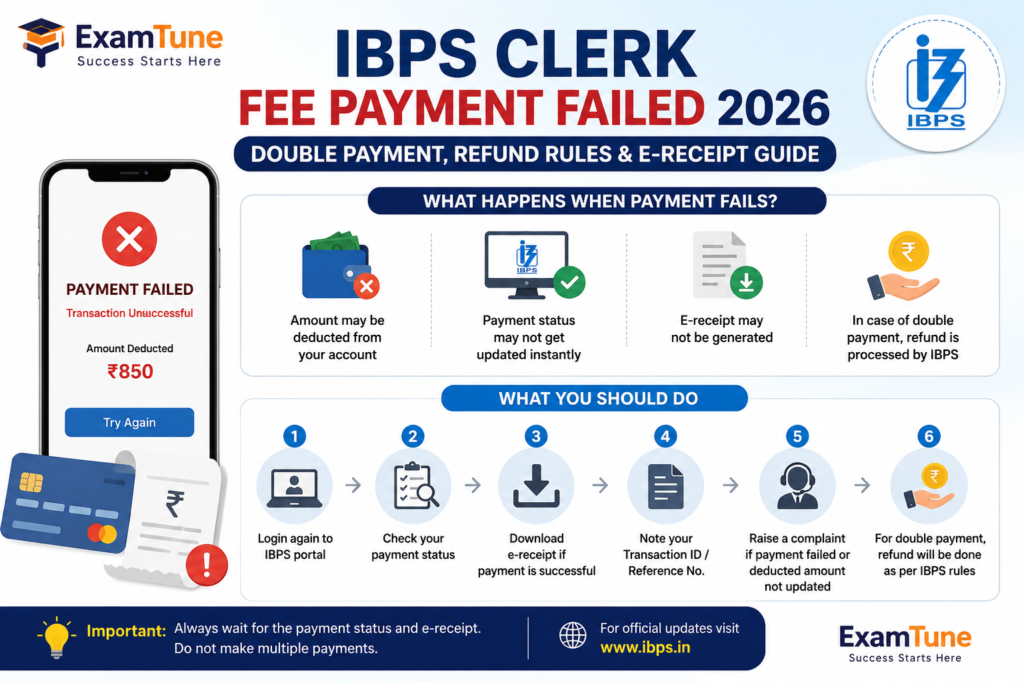
How to Download IBPS Clerk E-Receipt 2026
The e-receipt is the main system-generated proof of successful online payment. Candidates dealing with IBPS Clerk Fee Payment Failed 2026 should always check whether the receipt has been generated before taking any further action.
- Visit the official IBPS website at ibps.in.
- Open the CRP Customer Service Associates section.
- Select the CRP CSA-XVI online application link.
- Open the login for already registered candidates.
- Enter the registration number, password and security code.
- Select the e-receipt print or download option.
- Save the e-receipt as a PDF.
- Take a clear printout for future reference.
Verify the candidate’s name, registration number, payment date, amount and transaction information on the e-receipt. The e-receipt and application printout should be retained by the candidate. They should not be sent to IBPS or participating banks unless specifically requested at a later stage.
Available Online Payment Methods
For IBPS Clerk 2026, the application fee can be paid through supported online methods displayed on the payment gateway. These include:
- RuPay debit card
- Visa debit or credit card
- MasterCard debit or credit card
- Maestro card
- Internet banking
- IMPS
- Cash cards
- Mobile wallets
- UPI
Candidates must also bear the applicable bank transaction charges. When retrying after IBPS Clerk Fee Payment Failed 2026, use a stable internet connection and ensure that sufficient balance and transaction limits are available. Avoid opening multiple payment tabs or using the same candidate login on different devices at the same time.
How to Raise a Complaint for IBPS Clerk Fee Payment Failed 2026
If the payment status remains incorrect, the e-receipt is unavailable, or an additional debit is not resolved, candidates can use the official IBPS Candidate Grievance Redressal System. The grievance portal allows candidates to register a new complaint. Every registered complaint is assigned a unique complaint number that can be used to track its status. While submitting a complaint for IBPS Clerk Fee Payment Failed 2026, provide accurate information and explain the payment issue clearly. Mention whether the portal showed failed, pending or successful, whether the amount was deducted, and whether the e-receipt was generated.
Details Required for the Payment Complaint
- Candidate’s full name
- Provisional registration number
- Registered email address
- Registered mobile number
- Recruitment name: CRP CSA-XVI
- Date and approximate time of payment
- Application fee amount
- Transaction ID or UPI reference number
- Bank reference number
- Screenshot of the payment error
- Screenshot or statement showing the debit
- Copy of the successful e-receipt, if available
Candidates can register a grievance through the IBPS Candidate Grievance Redressal System. After submitting the complaint, save the complaint number and confirmation email. The complaint status can be checked using the registered email address and complaint number.
7 Important Tips to Avoid IBPS Clerk Payment Failure
1. Complete Payment Before the Last Date
Heavy traffic near the registration deadline may slow down the application portal or payment gateway. Complete the application and fee payment early so that IBPS Clerk Fee Payment Failed 2026 can be resolved without last-minute pressure.
2. Use a Stable Internet Connection
Avoid unstable mobile networks or public Wi-Fi. A sudden internet disconnection may interrupt communication between the bank and payment gateway.
3. Do Not Press Back or Refresh
After submitting payment information, wait for the response from the server. Pressing Back or Refresh may cause payment failure, a delayed response or double payment.
4. Check Balance and Transaction Limit
Check the available account balance, card limit, UPI daily limit and online transaction settings before initiating payment.
5. Use Only One Browser Tab
Multiple browser tabs may create duplicate sessions and confusion regarding the final payment status. Complete the entire payment process in one active tab.
6. Save Every Payment Confirmation
Take screenshots and note the transaction reference number. These records will be useful if IBPS Clerk Fee Payment Failed 2026 requires an IBPS complaint or bank dispute.
7. Download the E-Receipt Immediately
Do not close the application after seeing only a successful message from the bank. Download the e-receipt and final application form to confirm that registration has been completed.
Common Reasons for IBPS Clerk Transaction Failure
| Possible Reason | Recommended Action |
|---|---|
| Incorrect or expired OTP | Request a new OTP and enter it carefully. |
| Insufficient account balance | Add sufficient funds and retry the payment. |
| UPI or card transaction limit | Check the daily limit or use another supported payment mode. |
| Payment gateway timeout | Log in again and verify the payment status before retrying. |
| Website traffic or server delay | Wait for the server response and try during a less busy period. |
| Back or Refresh button used | Check for duplicate debit and verify whether an e-receipt was generated. |
| Bank security restriction | Enable online transactions or contact the bank. |
IBPS Clerk Application Fee 2026
The IBPS Clerk application fee is ₹175 inclusive of GST for SC, ST, PwBD, ESM and DESM candidates. The fee is ₹850 inclusive of GST for all other candidates. Applicable bank transaction charges for online payment must be paid by the candidate. The online fee-payment window is scheduled from 1 August 2026 to 21 August 2026, both dates inclusive. Candidates should remember that successful fee payment is necessary to complete registration. An application affected by IBPS Clerk Fee Payment Failed 2026 may remain invalid until the required fee is successfully received through the official payment portal.
Final Advice on IBPS Clerk Fee Payment Failed 2026
The safest approach is to verify the payment through the official candidate login, download the e-receipt and retain the final application form. When the amount is deducted but the status is unsuccessful, keep all transaction records and check the candidate login before making another payment. If another payment becomes necessary, retain evidence of both transactions and use the official grievance mechanism for unresolved issues. Do not depend on unofficial refund timelines or random claims circulated on social media. Resolve IBPS Clerk Fee Payment Failed 2026 through the official application portal, your bank or payment service provider, and the IBPS grievance system. Most importantly, complete the fee-payment process well before the registration deadline.
Prepare for IBPS Clerk 2026
After completing your application and payment, start your preparation with topic-wise tests, full-length mock tests and detailed performance analysis. Attempt Free IBPS Clerk Mock TestPrepare for IBPS Clerk with ExamTune
Boost your preparation with India’s trusted banking exam platform.-
- ✔ Live Interactive Classes
- ✔ Recorded Video Lectures
- ✔ Latest PDF Notes
- ✔ Section-wise Mock Tests
- ✔ Previous Year Papers
- ✔ Daily Practice Questions
- ✔ Expert Doubt Support
- ✔ Interview & Document Verification Guidance
Related IBPS Clerk 2026 Guides
Frequently Asked Questions
What should I do if IBPS Clerk fee payment fails?
Log in again to the official IBPS application portal, check the payment status and complete the fee payment before the last date if it is still unsuccessful.
What if money is deducted but the IBPS Clerk payment status shows failed? Answer: Wait for the trans
Wait for the transaction status to update, check whether an e-receipt has been generated and save the bank transaction ID before trying another payment.
Is a bank debit message proof of successful IBPS Clerk payment?
No. Successful payment should also be confirmed on the IBPS portal through the payment status and system-generated e-receipt.
Can I pay the IBPS Clerk application fee again after a failed transaction?
Yes. If the portal still shows an unsuccessful or incomplete payment, candidates can log in again and complete the payment online.
How can I download the IBPS Clerk e-receipt?
Log in to the official IBPS application portal using your registration number and password, then select the e-receipt print or download option.
What should I do after double payment of the IBPS Clerk fee?
Save both transaction references, download the successful e-receipt and contact the bank or IBPS grievance portal regarding the additional debit.
Will the IBPS Clerk double payment amount be refunded automatically?
A fixed automatic refund timeline is not officially guaranteed. Candidates should check with their bank and raise an official grievance if the extra amount is not reversed.
Why is my IBPS Clerk e-receipt not generated?
The transaction may not have been completed successfully, or the payment status may still be pending. Log in again and verify the application status.
Where can I complain about an IBPS Clerk payment issue?
Candidates can submit a complaint through the official IBPS Candidate Grievance Redressal System and save the complaint number for tracking.
Is the IBPS Clerk application valid without successful fee payment?
No. The application remains incomplete until the required fee is successfully paid and confirmed on the official portal.
Practice free quizzes, mock tests, current affairs and exam-wise preparation resources on ExamTune.