NICL Assistant Left Thumb Impression: 7 Important Upload Guidelines
Quick Overview
Practice free quizzes, mock tests, current affairs and exam-wise preparation resources on ExamTune.
Download PDF
Check the NICL Assistant Left Thumb Impression guidelines, including format, size, upload process, and important instructions for the online application.
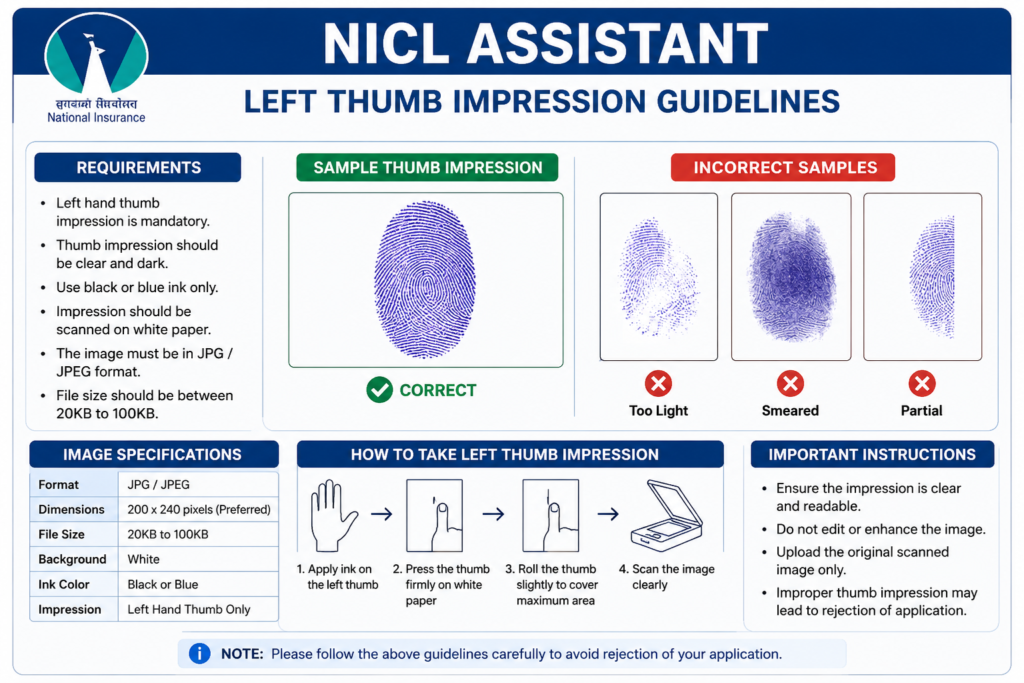
According to the NICL Assistant 2026 recruitment instructions, the left thumb impression should be made on white paper using black or blue ink. The image should be uploaded in JPG/JPEG format, preferably in 240 × 240 pixels at 200 DPI, with a file size between 20 KB and 50 KB.
The NICL Assistant application process was conducted from 18 July to 7 August 2026 and is now closed. Candidates who successfully submitted their applications can use this page to verify whether the thumb impression uploaded during registration followed the prescribed specifications.
NICL Assistant Left Thumb Impression 2026 Latest Update
- Application registration is now closed.
- Last date to apply: 7 August 2026.
- Left Thumb Impression Size: 20 KB – 50 KB.
- Preferred Dimensions: 240 × 240 pixels.
- Resolution: 200 DPI.
- Physical Size: approximately 3 cm × 3 cm.
- Format: JPG / JPEG.
- Ink: Black or Blue.
- Background: White Paper.
NICL Assistant Left Thumb Impression 2026 Overview
| Particular | Official Requirement |
|---|---|
| Recruitment | NICL Assistant Recruitment 2026 |
| Post | Assistant (Class III) |
| Total Vacancies | 500 |
| Document | Left Thumb Impression |
| File Format | JPG / JPEG |
| Preferred Dimensions | 240 × 240 pixels |
| Resolution | 200 DPI |
| Physical Size | 3 cm × 3 cm |
| File Size | 20 KB – 50 KB |
| Paper | White Paper |
| Ink Colour | Black or Blue Ink |
| Application Status | Closed |
| Official Website | nationalinsurance.nic.co.in |
NICL Assistant Left Thumb Impression Size 2026
The NICL Assistant Left Thumb Impression size must comply with the specifications given in the recruitment guidelines. Candidates were required to scan and upload the image carefully because an unclear, smudged or incorrectly sized thumb impression could affect the validity of the application.
| Specification | Requirement |
|---|---|
| File Type | JPG / JPEG |
| Dimensions | 240 × 240 pixels |
| DPI | 200 DPI |
| Physical Dimension | 3 cm × 3 cm |
| Minimum File Size | 20 KB |
| Maximum File Size | 50 KB |
| Ink | Black or Blue |
| Paper | Clean White Paper |
Important:
Do not use old or generic banking-exam specifications. For NICL Assistant 2026, the preferred thumb impression size is 240 × 240 pixels at 200 DPI with a 20 KB to 50 KB file size.
How to Take NICL Assistant Left Thumb Impression Correctly?
Candidates should prepare the NICL Assistant Left Thumb Impression carefully so that the fingerprint pattern remains clearly visible after scanning.
- Take a clean sheet of white paper.
- Clean and dry your left thumb before taking the impression.
- Apply black or blue ink evenly on the thumb.
- Avoid applying excessive ink because it can make the fingerprint smudged.
- Gently place the left thumb on the white paper.
- Do not move or slide the thumb while taking the impression.
- Lift the thumb vertically after making the impression.
- Check whether the fingerprint ridges are clearly visible.
- Allow the impression to dry before scanning.
- Scan the impression and crop the image closely around it.
Can I Use Right Thumb Impression for NICL Assistant 2026?
Yes, but only when the candidate does not have a left thumb.
The NICL Assistant 2026 recruitment instructions specifically state that if a candidate does not have a left thumb, he or she may use the right thumb impression while applying.
Right Thumb Rule:
Candidates who have a normal left thumb should use the left thumb impression. The right thumb is an alternative only where the candidate does not have a left thumb.
How to Scan NICL Assistant Left Thumb Impression?
NICL also provided scanning instructions for the uploaded documents. Candidates should ensure that the scanned thumb impression remains clear after resizing and compression.
- Set scanner resolution to at least 200 DPI.
- Set the colour mode to True Colour.
- Scan the thumb impression clearly.
- Crop the image to the edge of the impression.
- Resize it to approximately 240 × 240 pixels.
- Keep the file size between 20 KB and 50 KB.
- Save the final image as .jpg or .jpeg.
- Check that the fingerprint is clearly visible after resizing.
How to Upload NICL Assistant Left Thumb Impression?
The NICL Assistant application window is now closed, but candidates can check the original upload process below for reference.
- Open the NICL Assistant online application form.
- Complete the required registration and personal details.
- Open the document upload section.
- Click on the Upload Left Thumb Impression option.
- Browse the folder where the scanned thumb impression is saved.
- Select the JPG/JPEG image.
- Click on Open/Upload.
- Preview the uploaded image.
- Check whether the impression is clear and prominently visible.
- If the image appears unclear or smudged, re-upload a clearer image before final submission.
If the file size or format did not meet the prescribed requirements, the application portal could display an error message.
Can Incorrect Thumb Impression Cause NICL Application Rejection?
Yes. NICL’s document upload instructions state that an application may be rejected if the left thumb impression is unclear or smudged.
Candidates were therefore required to preview all uploaded images before completing the application.
Important:
The NICL online application was not considered complete unless the required photograph, signature, left thumb impression and handwritten declaration were uploaded according to the prescribed requirements.
Candidates were advised to verify the image carefully before clicking the final Complete Registration option.
Can NICL Assistant Left Thumb Impression Be Changed After Submission?
Candidates were allowed to preview and re-upload an unclear thumb impression before final submission of the application form.
However, the NICL recruitment instructions state that after completion of registration, requests for changes or corrections in application particulars are not entertained.
Since the application window closed on 7 August 2026, candidates cannot now reopen the regular application form simply to replace the uploaded thumb impression.
Common Mistakes in NICL Assistant Left Thumb Impression
Candidates should avoid the following errors while preparing a thumb impression for banking and insurance recruitment forms:
- Uploading a blurred fingerprint.
- Uploading a smudged impression.
- Using excessive ink.
- Making the impression too light.
- Uploading someone else’s thumb impression.
- Using the right thumb despite having a normal left thumb.
- Uploading PNG, PDF or another unsupported file type.
- Uploading an image below 20 KB or above 50 KB.
- Using dimensions that distort the fingerprint.
- Uploading a coloured or heavily edited image.
- Leaving excessive blank space around the impression.
- Uploading the thumb image in the wrong document field.
Tips for Clear NICL Assistant Thumb Impression Image
- Wash and dry your thumb before taking the impression.
- Use good-quality black or blue ink.
- Do not press too hard on the paper.
- Take two or three impressions and select the clearest one.
- Use clean white paper without lines or patterns.
- Scan at a minimum of 200 DPI.
- Crop unnecessary white space.
- Do not over-compress the image.
- Confirm that fingerprint ridges remain visible after resizing.
- Verify the final file size before upload.
Why is NICL Assistant Left Thumb Impression Required?
The NICL Assistant Left Thumb Impression 2026 forms part of the candidate’s application record. It helps maintain authenticity of the application and can support candidate identification during different stages of the recruitment process.
The impression uploaded with the application must therefore belong to the applicant and not to any other person.
NICL Assistant Left Thumb Impression 2026 Checklist
| Check | Correct Requirement |
|---|---|
| Whose Thumb? | Candidate’s Own Left Thumb |
| Ink | Black or Blue |
| Paper | White |
| Dimensions | 240 × 240 Pixels |
| DPI | 200 DPI |
| File Size | 20 KB – 50 KB |
| Format | JPG / JPEG |
| Image | Clear and Not Smudged |
| Right Thumb Allowed? | Yes, if candidate does not have a left thumb |
Related NICL Assistant 2026 Articles
- NICL Assistant Notification 2026
- NICL Assistant Application Form 2026
- NICL Assistant Handwritten Declaration 2026
- NICL Assistant Photo and Signature 2026
- NICL Assistant Documents Required 2026
- NICL Assistant Eligibility 2026
- NICL Assistant Exam Pattern 2026
- NICL Assistant Syllabus 2026
- NICL Assistant Admit Card 2026
NICL Assistant Left Thumb Impression Official Guidelines
Candidates should refer to the NICL recruitment notification and official recruitment portal for final instructions related to application documents and recruitment stages.
Last Updated: 20 August 2026
This article has been updated with the NICL Assistant 2026 document-upload specifications. The online application process closed on 7 August 2026.
Frequently Asked Questions
What is the NICL Assistant Left Thumb Impression size 2026?
The file size should be between 20 KB and 50 KB.
What are the dimensions of NICL Assistant Left Thumb Impression?
The preferred dimensions are 240 × 240 pixels at 200 DPI, approximately 3 cm × 3 cm.
What is the NICL Assistant thumb impression file format?
The thumb impression should be uploaded in JPG or JPEG format.
Can I use right thumb impression for NICL Assistant?
Yes. If a candidate does not have a left thumb, the official instructions allow the candidate to use the right thumb impression.
Can I upload a thumb impression below 20 KB?
No. Candidates were required to keep the image within the prescribed 20 KB to 50 KB range.
Is 240 × 240 pixels compulsory for NICL Assistant thumb impression?
The notification describes 240 × 240 pixels at 200 DPI as the preferred dimensions for the required image quality.
Can a smudged thumb impression be accepted?
Candidates should not upload a smudged image. NICL states that an unclear or smudged thumb impression may result in rejection of the application.
Can someone else's thumb impression be uploaded?
No. The thumb impression must belong to the candidate who submitted the application.
Is the NICL Assistant Application Form 2026 still open?
No. NICL Assistant online registration closed on 7 August 2026.
Where can I check the latest thumb impression guidelines?
Candidates should check the official NICL website and the latest recruitment notification for updated thumb impression specifications and upload instructions.
About the Author

Practice free quizzes, mock tests, current affairs and exam-wise preparation resources on ExamTune.