NICL Assistant Handwritten Declaration 2026: Format, Text, Size & Upload Guidelines
Quick Overview
Practice free quizzes, mock tests, current affairs and exam-wise preparation resources on ExamTune.
Download PDF
Download the official handwritten declaration format and upload guidelines for NICL Assistant 2026.
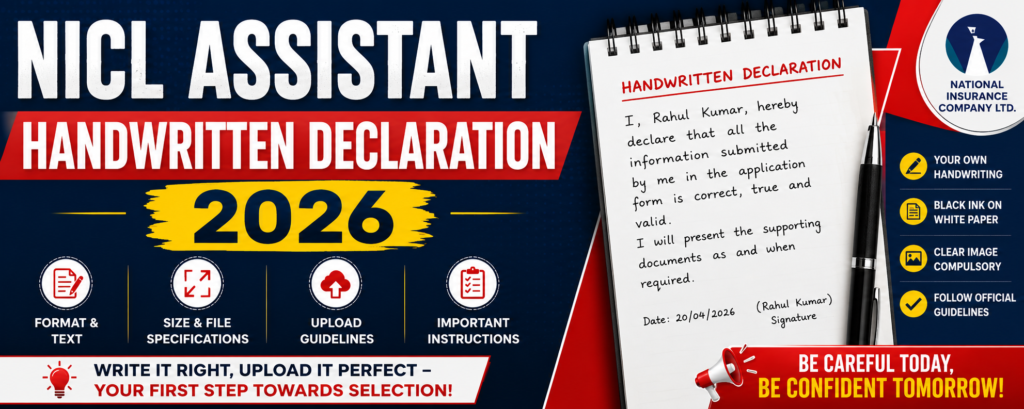
NICL Assistant Handwritten Declaration 2026 – Check official text, 800×400 pixel dimensions, 50–100 KB file size and upload rules.
The NICL Assistant 2026 online application window was open from
18 July to 7 August 2026 and is now closed.
The handwritten declaration was one of the scanned documents required during online registration.
The August Phase-I call letter is a historical recruitment-stage document; current download availability must be checked on the official portal.
The information below is retained as the official reference for declaration text, size, format and upload specifications.
The scanned declaration had to be uploaded in JPG/JPEG format. The preferred dimensions were 800 × 400 pixels at 200 DPI, equivalent to approximately 10 cm × 5 cm, with a file size between 50 KB and 100 KB.
Here you can check the official NICL Assistant Handwritten Declaration 2026 text, image size, file format, scanning procedure, upload instructions and mistakes that candidates were required to avoid.
NICL Assistant Handwritten Declaration 2026 Overview
| Organization | National Insurance Company Limited (NICL) |
| Post | Assistant – Class III |
| Total Vacancies | 500 |
| Document | Handwritten Declaration |
| Required During | Online Registration |
| Application Dates | 18 July to 7 August 2026 |
| Current Application Status | Closed |
| Language | English Only |
| Writing | Candidate’s Own Handwriting |
| Paper | White Paper |
| Ink | Black Ink |
| File Type | JPG / JPEG |
| Preferred Dimensions | 800 × 400 Pixels |
| Preferred Resolution | 200 DPI |
| File Size | 50 KB – 100 KB |
NICL Assistant Handwritten Declaration 2026 Text
Candidates were required to reproduce the following declaration in their own handwriting:
“I, ___________ (Name of the candidate), hereby declare that all information submitted by me in the application form is correct, true and valid. I will present the supporting documents as and when required.”
Replace the blank with your own name. The declaration must be written in
English only, in the candidate’s own handwriting,
and should not be written in CAPITAL LETTERS.
How to Write Your Name in NICL Handwritten Declaration?
Suppose the candidate’s name is Rahul Kumar. The declaration would begin as:
“I, Rahul Kumar, hereby declare that all information submitted by me in the application form is correct, true and valid. I will present the supporting documents as and when required.”
Candidates should enter the same name used in their application form and write the complete declaration themselves.
NICL Assistant Handwritten Declaration Size 2026
The NICL Assistant Handwritten Declaration Size 2026 was clearly prescribed in the detailed recruitment advertisement. Candidates were required to prepare the scanned file according to the following specifications.
| Specification | Official Requirement |
|---|---|
| File Type | JPG / JPEG |
| Preferred Dimensions | 800 × 400 Pixels |
| Preferred Resolution | 200 DPI |
| Approx. Physical Size | 10 cm × 5 cm (Width × Height) |
| File Size | 50 KB – 100 KB |
| Paper | White Paper |
| Ink | Black Ink |
| Language | English Only |
| Capital Letters | Not Accepted |
NICL Assistant Handwritten Declaration should be
800 × 400 pixels at 200 DPI (preferred), 50–100 KB and JPG/JPEG format.
7 Important NICL Assistant Handwritten Declaration Rules
- Use your own handwriting:
The declaration must be written by the applicant and not by another person. - Write only in English:
A declaration written in another language is not valid under the notified instructions. - Use black ink:
Write clearly on clean white paper using black ink. - Do not use capital letters:
The complete handwritten declaration must not be written in CAPITAL LETTERS. - Use the prescribed text:
Do not replace the official declaration with another statement. - Follow the image specifications:
Keep the file in JPG/JPEG format with the prescribed dimensions and KB range. - Check image clarity:
The declaration should not be blurred, smudged or improperly cropped.
How to Prepare NICL Assistant Handwritten Declaration?
- Take a clean white sheet of paper.
- Use a black ink pen.
- Write the prescribed declaration in English.
- Enter your full name in the blank space.
- Use your normal handwriting rather than capital/block letters.
- Make sure every word is clearly readable.
- Allow the ink to dry before scanning.
- Scan and crop the declaration carefully.
- Save the image in JPG or JPEG format.
- Verify dimensions and KB size before uploading.
How to Scan NICL Assistant Handwritten Declaration 2026?
The detailed NICL recruitment advertisement also provides document-scanning instructions.
- Set the scanner resolution to a minimum of 200 DPI.
- Set the colour option to True Colour.
- Crop unnecessary blank space around the declaration.
- Keep the preferred dimensions at 800 × 400 pixels.
- Save the scanned image in JPG or JPEG format.
- Keep the final file size between 50 KB and 100 KB.
- Open the final file and verify that every word remains clearly visible.
Do not excessively compress the JPG just to reduce KB size. The declaration should remain clear and readable after resizing.
How to Upload NICL Assistant Handwritten Declaration?
During the application period, the online form provided separate links to upload the photograph, signature, left thumb impression and handwritten declaration.
- Open the NICL Assistant online application form.
- Proceed to the document-upload section.
- Select the Hand Written Declaration upload option.
- Browse to the folder where the scanned image is saved.
- Select the correct JPG/JPEG file.
- Click Open/Upload.
- Check the uploaded image preview.
- Confirm that the declaration is clear and fully visible.
- Re-upload the image before final submission if it appears blurred or smudged.
The NICL Assistant 2026 online application window closed on 7 August 2026. These steps are retained for candidates checking the official application-document requirements.
When Can NICL Handwritten Declaration Become Invalid?
NICL specifically warned candidates that the application could be considered invalid where the prescribed handwritten-declaration conditions were not followed.
- The declaration is written by another person.
- It is written in a language other than English.
- The complete declaration is written in capital letters.
- The image is blurred or smudged.
- The declaration has been uploaded in the wrong document field.
- The file does not meet the required upload format or size.
- The required handwritten declaration is not uploaded with the application.
Common NICL Assistant Handwritten Declaration Mistakes
- Typing or printing the declaration instead of handwriting it.
- Using incorrect declaration wording.
- Writing the whole text in capital letters.
- Writing the declaration in Hindi or another language.
- Allowing somebody else to write the declaration.
- Using blue or coloured ink instead of the notified black ink.
- Uploading an unclear or smudged scan.
- Uploading the wrong image under the handwritten-declaration field.
- Keeping the file below 50 KB or above 100 KB.
- Cropping the image so tightly that words are cut off.
Rule for Visually Impaired Candidates Who Cannot Write
The detailed NICL Assistant recruitment notification provides a specific exception for
Visually Impaired candidates who cannot write.
Such candidates may get the prescribed declaration text typed and put their
left-hand thumb impression below the typed declaration, after which the document can be uploaded according to the prescribed specifications.
This provision applies specifically to Visually Impaired candidates who cannot write. Other candidates were required to submit the declaration in their own handwriting.
NICL Assistant Handwritten Declaration vs Signature
| Particular | Handwritten Declaration | Signature |
|---|---|---|
| Paper | White Paper | White Paper |
| Ink | Black Ink | Black Ink |
| Preferred Dimensions | 800 × 400 Pixels | 140 × 60 Pixels |
| File Size | 50–100 KB | 10–20 KB |
| Written By | Candidate | Candidate |
| Capital Letters | Not Accepted | Not Accepted |
NICL Assistant Handwritten Declaration Quick Checklist
- ✓ Correct official declaration text
- ✓ Candidate’s own handwriting
- ✓ English language
- ✓ White paper
- ✓ Black ink
- ✓ Not written completely in CAPITAL LETTERS
- ✓ JPG/JPEG format
- ✓ 800 × 400 pixels preferred
- ✓ 200 DPI preferred
- ✓ 50 KB to 100 KB
- ✓ Clear and readable scan
Related NICL Assistant 2026 Articles
NICL Assistant Official Notification PDF 2026
NICL Assistant Application Form 2026
NICL Assistant Eligibility 2026
NICL Assistant Photo and Signature Guidelines
NICL Assistant Left Thumb Impression
NICL Assistant Documents Required 2026
NICL Assistant Admit Card 2026
NICL Assistant Exam Pattern 2026
NICL Assistant Handwritten Declaration Official Links
| Resource | Official Link |
|---|---|
| NICL Recruitment Page | Visit NICL Recruitment Page |
| NICL Assistant Detailed Advertisement | Download Official Notification PDF |
NICL Assistant Handwritten Declaration 2026 – Final Summary
The NICL Assistant Handwritten Declaration 2026 had to be written in English by the candidate on white paper using black ink. The scanned image had to be saved in JPG/JPEG format, with preferred dimensions of 800 × 400 pixels at 200 DPI and a file size of 50 KB to 100 KB.
Candidates were also required to ensure that the declaration was not written completely in capital letters and that the uploaded image was clear and readable. The NICL Assistant 2026 application process has now closed, but candidates should preserve their submitted application details and regularly check the NICL recruitment portal for the ongoing examination process.
Frequently Asked Questions
What is the NICL Assistant Handwritten Declaration 2026?
It is a handwritten declaration that candidates must upload while filling out the NICL Assistant 2026 online application form.
What is the NICL Assistant handwritten declaration text?
Candidates had to use the exact declaration wording prescribed in the official NICL Assistant recruitment advertisement and insert their own name in the specified space.
What is the NICL Assistant handwritten declaration size?
The preferred image dimensions are 800 × 400 pixels at 200 DPI, with an approximate physical size of 10 cm × 5 cm.
What is the file size for NICL Assistant handwritten declaration?
The prescribed file size is 50 KB to 100 KB.
Which ink should be used?
The NICL Assistant notification specifies black ink on white paper for the handwritten declaration.
Can the declaration be written in Hindi?
No. The prescribed handwritten declaration must be written in English only.
Can I write the declaration in capital letters?
No. A handwritten declaration written completely in CAPITAL LETTERS is not accepted.
Can someone else write the declaration for me?
Normally the declaration must be in the candidate’s own handwriting. The official instructions permit a visually impaired candidate who cannot write to use the prescribed typed declaration and put the left-thumb impression below it.
Is the NICL Assistant application form still open?
No. Online registration was conducted from 18 July to 7 August 2026 and the application window is now closed.
About the Author

Practice free quizzes, mock tests, current affairs and exam-wise preparation resources on ExamTune.