IBPS Clerk Ex-Servicemen Passbook Printing & Account Update Process 2026: Complete Guide
Quick Overview
Practice free quizzes, mock tests, current affairs and exam-wise preparation resources on ExamTune.
IBPS Clerk ESM Passbook Printing Guide 2026 PDF
Download the IBPS Clerk ESM Passbook Printing PDF to understand the complete process, clerk duties, safety checks, common printing problems and customer-service guidelines.
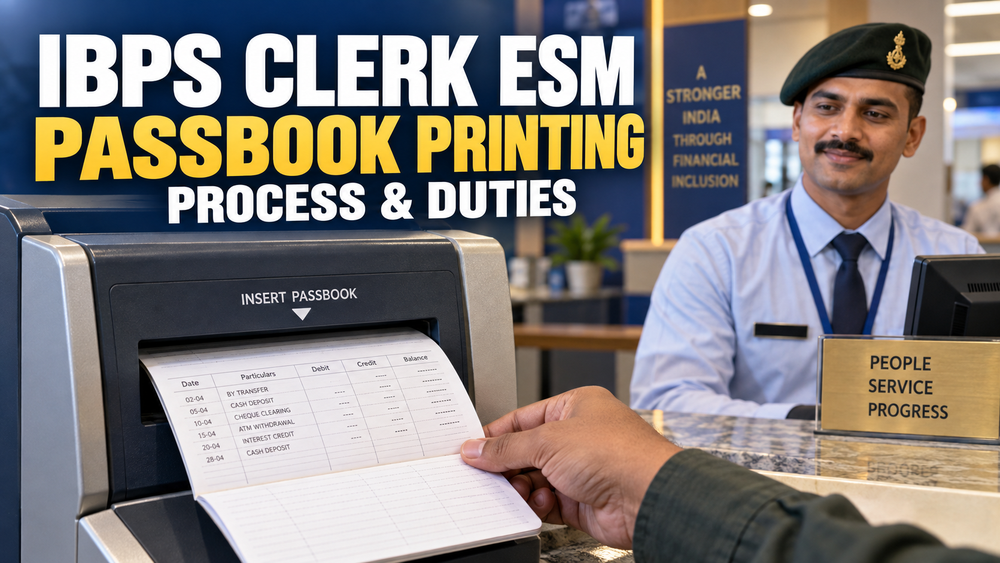
IBPS Clerk ESM Passbook Printing is a practical branch-banking responsibility that Ex-Servicemen may handle after joining a participating Public Sector Bank as a Customer Service Associate. Depending on the bank, branch and assigned counter, a clerk may guide customers in updating passbooks, check printed transaction entries and help resolve routine passbook-related problems.
Many banks now provide self-service passbook printing kiosks at branches, e-lobbies and digital banking locations. Customers can use these machines to update eligible passbooks without waiting at a regular branch counter. However, clerical assistance may still be required when the passbook is damaged, full, incorrectly positioned or not recognised by the machine.
This guide explains the IBPS Clerk ESM Passbook Printing process, possible clerk duties, safety checks, common machine problems, customer-service practices and mistakes that should be avoided while handling customer passbooks.
IBPS Clerk ESM Passbook Printing Overview
| Particular | Details |
|---|---|
| Article Topic | IBPS Clerk ESM Passbook Printing |
| Relevant Post | Customer Service Associate, commonly known as IBPS Clerk |
| Applicable Candidates | All selected clerical employees, including Ex-Servicemen |
| Nature of Work | Customer service and branch operational support |
| Possible Responsibility | Passbook updating, kiosk guidance and printing-error assistance |
| Working Area | Customer-service counter, branch lobby or self-service kiosk |
| Duty Allocation | Depends on the employing bank, branch and assigned desk |
| Primary Requirement | Accuracy, confidentiality and compliance with bank SOPs |
| Reference Sources | RBI customer-service directions and employing bank instructions |
What Is Passbook Printing in Banking?
Passbook printing is the process of recording updated account transactions in a customer’s physical passbook. The machine prints transaction information already available in the bank’s Core Banking Solution or connected banking system.
Depending on the account and available records, the printed information may include deposits, withdrawals, cheque transactions, fund transfers, interest credits, charges and other debit or credit entries. The passbook printing machine does not create or approve transactions; it only prints information available in the connected banking system.
The Reserve Bank of India has instructed banks to provide meaningful and understandable transaction particulars in passbooks and account statements. Therefore, customers should be able to identify the nature of a transaction from the printed narration wherever applicable.
Is Passbook Printing a Compulsory IBPS Clerk Duty?
Passbook-related assistance may form part of an IBPS Clerk’s customer-service or branch-support responsibilities, but it should not be described as a compulsory daily duty for every clerk. IBPS conducts the recruitment process, while the participating bank decides the employee’s posting, training, desk allocation and operational responsibilities.
A selected clerk may work at the cash counter, customer-service desk, account-opening desk, clearing section, deposit section or another branch operations desk. Passbook assistance is one possible responsibility within this wider job profile.
Important: The exact passbook printing procedure, authorisation requirement, replacement charge and customer-verification process can vary between banks. Employees must follow their bank’s current Standard Operating Procedure.
Role of an IBPS Clerk in Passbook Printing
- Guide customers towards the designated passbook printing kiosk.
- Explain how the passbook should be positioned or inserted.
- Check whether sufficient printable space is available.
- Assist senior citizens and customers unfamiliar with self-service machines.
- Examine unclear, incomplete or misaligned printing.
- Guide customers when the passbook is full, lost or damaged.
- Refer account-level restrictions or transaction discrepancies to the authorised officer.
- Protect customer account information and maintain confidentiality.
- Report recurring kiosk, printer, barcode or network problems.
- Follow the employing bank’s security and customer-service procedures.
An IBPS Clerk should not manually alter transaction information, remove an account restriction or promise reversal of a transaction. Such matters must be handled through the bank’s authorised system and escalation process.
Step-by-Step Passbook Printing Process
The exact process depends on the bank and the type of passbook printer being used. A typical customer-assistance process may include the following steps:
- Understand whether the customer needs a normal update, replacement or correction-related assistance.
- Check the account number and customer details printed on the passbook.
- Confirm that the passbook has sufficient blank printing space.
- Check whether the pages are folded, torn, wet or damaged.
- Open or position the passbook according to the instructions displayed on the machine.
- Insert the passbook carefully without forcing it into the printer.
- Allow the machine to identify, align and update the passbook.
- Wait until the passbook is completely released by the machine.
- Check whether the entries are clear, aligned and complete.
- Return the passbook to the correct customer or escalate the problem when required.
Some automated machines can align the passbook, locate the appropriate printable area and turn pages automatically. Nevertheless, the features available may differ according to the bank and machine model.
Important Checks Before Updating a Passbook
- Confirm that the passbook belongs to the correct bank and account.
- Check the account number and printed customer name.
- Follow identity verification requirements whenever prescribed by the bank.
- Ensure that the passbook contains sufficient blank space.
- Check for folded, loose, torn or damaged pages.
- Make sure the printer or kiosk is showing an operational status.
- Verify that previous entries have not been overprinted.
- Protect the customer’s balance and transaction information.
- Follow additional controls for restricted, frozen or inoperative accounts.
ExamTune Tip: Discipline and attention to detail developed during defence service can help Ex-Servicemen handle customer documents accurately. However, every operational action must remain within the employee’s assigned authority.
Common Passbook Printing Problems and Solutions
| Problem | Possible Reason | Correct Action |
|---|---|---|
| Passbook not recognised | Incorrect insertion, damaged code or unsupported passbook | Reinsert it according to the displayed instructions and seek authorised assistance if the problem continues. |
| No transaction printed | No pending entry, system delay or connectivity problem | Check the machine status and refer unresolved account-related issues to the concerned desk. |
| Incomplete printing | Insufficient space, alignment problem or interrupted connection | Stop repeated printing and follow the bank’s troubleshooting procedure. |
| Misaligned entries | Folded page, damaged passbook or printer alignment issue | Do not continue printing over previous entries; report the issue. |
| Passbook stuck in machine | Paper jam or damaged page | Do not pull it forcefully. Inform authorised branch or technical staff. |
| Passbook pages are full | No printable space remains | Guide the customer through the bank’s new-passbook process. |
| Passbook lost or damaged | Replacement is required | Follow the bank’s identity verification, application and applicable fee procedure. |
| Account is restricted | Account-level operational restriction | Refer the matter to the authorised officer without promising immediate removal. |
| Customer disputes an entry | Unrecognised transaction or unclear narration | Register or escalate the query through the bank’s approved complaint process. |
When Can a New or Duplicate Passbook Be Required?
A customer may need a new or duplicate passbook in the following situations:
- All available printing pages have been used.
- The existing passbook is torn, damaged or unreadable.
- The passbook has been lost or misplaced.
- The passbook cannot be recognised by the authorised printing system.
- Account or customer information requires an authorised correction.
- The bank’s procedure requires replacement for technical reasons.
The clerk should not promise free replacement because charges and documentation requirements may differ between banks and account types. Lost-passbook cases may require an application, identity verification, declaration or other documents according to the bank’s policy.
Passbook Printing Safety and Confidentiality Rules
- Never hand over a passbook to the wrong customer.
- Do not disclose balances or transaction details to an unauthorised person.
- Do not leave customer passbooks unattended at the counter.
- Keep temporarily retained passbooks in secure custody.
- Do not overwrite, manually change or conceal printed transaction information.
- Do not force a damaged passbook into a printing machine.
- Report suspicious account activity through the bank’s authorised channel.
- Follow the bank’s data-protection, clean-desk and document-handling procedures.
RBI customer-service guidance states that passbooks retained by a branch should be kept securely. This makes careful custody and correct return of customer passbooks an important operational control.
Customer Service Tips for Ex-Servicemen Clerks
- Welcome the customer politely and identify the exact problem.
- Explain kiosk instructions in short and simple steps.
- Remain patient with elderly and first-time digital banking users.
- Avoid technical language when a simpler explanation is possible.
- Never argue when a customer disputes a transaction.
- Clearly explain when the matter needs officer-level assistance.
- Do not provide an estimated resolution time unless it is authorised.
- Maintain calm and professional behaviour during rush hours.
Physical Passbook vs E-Statement or M-Passbook
| Facility | How It Works | Important Point |
|---|---|---|
| Physical Passbook | Transactions are printed in a booklet through a branch printer or kiosk. | Useful for customers who prefer a physical transaction record. |
| Self-Service Kiosk | The customer inserts an eligible passbook into an automated machine. | Availability and supported accounts depend on the bank. |
| M-Passbook | Transaction information is viewed through the bank’s mobile application. | Registration and mobile-banking access may be required. |
| E-Statement | An account statement is viewed or received electronically. | Availability, frequency and delivery method depend on the bank. |
Customers should be guided only towards their bank’s official mobile application, internet banking portal or approved service channel. Clerks should never recommend unofficial applications for viewing sensitive account information.
Important Banking Terms Related to Passbook Printing
| Banking Term | Meaning |
|---|---|
| Passbook | A physical booklet containing account and transaction information. |
| CBS | Core Banking Solution used by banks for centralised banking operations. |
| Debit Entry | An entry representing money debited from an account. |
| Credit Entry | An entry representing money credited to an account. |
| Transaction Narration | A short description identifying the nature of a transaction. |
| Account Statement | A record of account transactions for a selected period. |
| Inoperative Account | An account classified as inoperative according to applicable banking rules. |
| Frozen Account | An account on which specified operations have been restricted. |
Daily Passbook Desk Checklist for an IBPS Clerk
- Check whether the passbook printer or kiosk is operational.
- Confirm that related stationery is available and securely controlled.
- Guide customers towards self-service facilities wherever available.
- Check the clarity and alignment of printed entries.
- Keep unattended customer documents secure.
- Record or escalate unresolved customer requests.
- Report repeated printer, barcode, CBS or connectivity problems.
- Follow the branch’s end-of-day document and desk procedures.
Mistakes to Avoid During Passbook Printing
- Assuming that a printing failure means the banking transaction has failed.
- Printing without checking the account details and available space.
- Repeatedly inserting a torn or folded passbook.
- Continuing after entries become misaligned.
- Leaving customer passbooks visible or unattended.
- Sharing account information with unauthorised persons.
- Promising a replacement, fee waiver or account correction without authority.
- Ignoring the employing bank’s current operating procedure.
Why Ex-Servicemen Can Perform Well in This Role
Ex-Servicemen generally bring discipline, responsibility, punctuality, situational awareness and experience in following established procedures. These qualities can support accurate document handling and professional customer service after joining a bank.
However, defence experience does not replace bank training. A newly joined employee should learn the bank’s CBS, passbook equipment, escalation matrix, customer-service policy and security controls before independently handling operational requests.
Official References for Passbook Services
- RBI Customer Service Guidelines
- RBI Directions on Recording Transaction Details
- PNB Passbook Updation Machine Information
Disclaimer: This article explains a general banking workflow for educational purposes. Actual duties, verification requirements, charges, machine operations and authorisation levels are determined by the employing bank’s current rules.
Final Words
IBPS Clerk ESM Passbook Printing involves more than inserting a passbook into a machine. A clerk may need to guide customers, verify the printed result, protect account information and escalate technical or account-related issues safely.
Ex-Servicemen can use their discipline and attention to detail to perform such customer-facing duties effectively. The most important rule is to follow the employing bank’s current SOP instead of making assumptions about account status, transaction correctness or passbook replacement.
Popular Online Live Classes


Ex-Servicemen IBPS Clerk 2026 Parakram Batch | IBPS Clerk Pre + Mains Course
Frequently Asked Questions
What is passbook printing in a bank?
Passbook printing is the process of updating a customer's passbook with the latest account transactions and balance information.
What is the role of an IBPS Clerk in passbook printing?
An IBPS Clerk assists customers by updating passbooks, verifying account details, and ensuring transaction records are correctly reflected.
What is an account update process?
The account update process changes customer details, such as the address, mobile number or email, after the required verification and approval. It is separate from passbook printing: printing transactions does not change the customer’s contact details or KYC records. Follow the bank’s prescribed request and verification process.
Which software is used for passbook printing?
Public Sector Banks generally use the Core Banking System (CBS) and connected banking software for passbook printing and account updates.
Can customers request passbook updates at any branch?
Many CBS-enabled Public Sector Banks allow passbook updates according to their branch facilities and operational policies.
What documents may be required for an account update?
Depending on the type of update, customers may need valid identity proof, address proof, and the prescribed request form as per the bank's guidelines.
Why is account information updated regularly?
Keeping account information updated helps ensure accurate communication, secure banking services, and compliance with banking requirements.
Do Ex-Servicemen receive training for passbook and account services?
New employees should follow the allotted bank’s induction and role-specific training. Passbook equipment, account-update permissions and customer-service procedures depend on the bank and the assigned desk; there is no single training programme guaranteed for every Ex-Serviceman.
What are the common mistakes to avoid during account updates?
Common mistakes include incorrect data entry, incomplete verification, updating wrong customer records, and not following bank procedures.
Where can candidates learn passbook printing and account update procedures?
Candidates can understand the basic concepts through banking study materials, while practical training is generally provided by the allotted Public Sector Bank after joining.
About the Author

Practice free quizzes, mock tests, current affairs and exam-wise preparation resources on ExamTune.