
IBPS Clerk 10th Certificate Upload 2026: Complete PDF Guide
Quick Overview
Practice free quizzes, mock tests, current affairs and exam-wise preparation resources on ExamTune.
Last Updated: 1 August 2026
What If the Name or Date of Birth Does Not Match in IBPS Clerk Form?
IBPS Clerk 10th Certificate Upload is a compulsory step in the CRP CSA-XVI online application process. Candidates must upload their SSC, SSLC, Class 10 or equivalent certificate before submitting the application form.
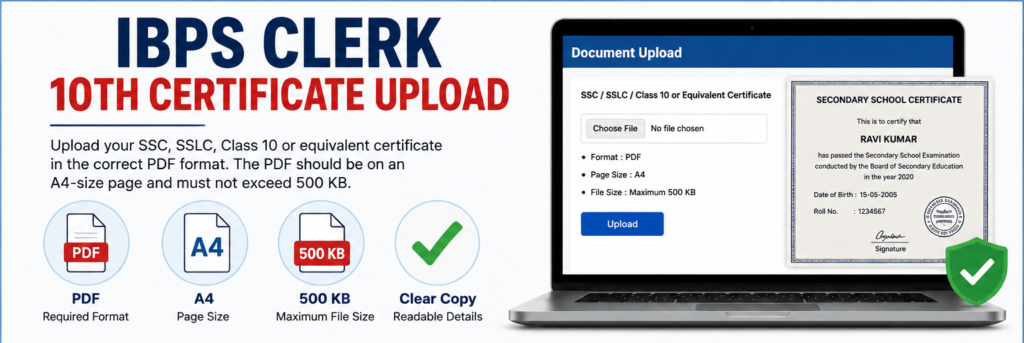
The IBPS Clerk 10th Certificate Upload document must be prepared as a clear A4-size PDF and should not exceed 500 KB. The candidate’s name, date of birth, board details and certificate information must remain complete and readable.
Required Format
Required Page Size
Maximum File Size
Readable Details
- Upload Overview
- Is the Certificate Mandatory?
- PDF Size and Format
- Which Document Should Be Uploaded?
- How to Scan the Certificate
- How to Reduce PDF Size
- How to Upload the PDF
- 7 Critical Errors
- Name or DOB Mismatch
- Final Checklist
- Frequently Asked Questions
IBPS Clerk 10th Certificate Upload Overview
| Requirement | Official Specification |
|---|---|
| Recruitment | IBPS Clerk 2026 – CRP CSA-XVI |
| Required Document | SSC, SSLC, Class 10 or equivalent certificate |
| File Format | |
| Page Size | A4 |
| Maximum File Size | 500 KB |
| Recommended Scan Resolution | Minimum 200 DPI |
| Scan Quality | Clear and readable |
| Upload Field | Separate certificate upload option |
| Application Mode | Online |
| Official Website | www.ibps.in |
Is the IBPS Clerk 10th Certificate Upload Mandatory?
Yes. The SSC, SSLC, Class 10 or equivalent certificate is included in the list of documents required during online registration.
The application portal provides a separate link for the IBPS Clerk 10th Certificate Upload. Candidates should complete this step before final submission.
Why Does IBPS Ask for the Class 10 Certificate?
The Class 10 certificate is an important educational record containing details such as the candidate’s name, date of birth, examination board and certificate information.
Candidates should ensure that the details visible in the certificate are consistent with the information entered in the online application form.
IBPS Clerk 10th Certificate Upload Size and Format
The IBPS Clerk 10th Certificate Upload must meet all three main requirements: PDF format, A4 page size and a maximum file size of 500 KB.

| Specification | Correct Requirement | Do Not Upload |
|---|---|---|
| Format | JPG, JPEG, PNG, HEIC or Word file | |
| Page Size | A4 | Uncropped oversized scanner page |
| File Size | Up to 500 KB | PDF larger than 500 KB |
| Visibility | Clear and readable | Blurred, dark or smudged copy |
| Upload Location | Class 10 certificate field | Photo, signature or declaration field |
Is There a Minimum File Size?
The official instructions specify that the PDF should not exceed 500 KB. They do not state a separate minimum file size for the Class 10 certificate.
However, excessive compression should be avoided because it may make the candidate’s name, date of birth, roll number, certificate number or board details unreadable.
Which Class 10 Document Should You Upload?
Upload the official SSC, SSLC, Class 10 or equivalent certificate issued by the recognised board or authority.
The official wording specifically asks for a certificate. Therefore, candidates should not replace it with an unrelated document or upload only a provisional screenshot unless the live application portal clearly permits it.
Can I Upload the Class 10 Marksheet?
The prescribed document is the SSC, SSLC, Class 10 or equivalent certificate. If your board issues a combined marksheet-cum-certificate, upload that official combined document.
If the marksheet and passing certificate are separate, prefer the official passing certificate unless the live portal or official instructions specify otherwise.
What If My Board Issued a Digital Certificate?
A genuine digitally issued certificate may be converted or downloaded as a clear PDF, provided it contains the required candidate and board details and satisfies the A4 and 500 KB requirements.
Do not upload a cropped mobile screenshot when a proper downloadable certificate PDF is available.
How to Scan the Class 10 Certificate Correctly
Follow these steps to prepare a clear document for the IBPS Clerk 10th Certificate Upload:
- Place the original certificate on a clean and flat surface.
- Use a scanner or a reliable mobile document-scanning application.
- Select A4 as the final page size.
- Use a minimum scan resolution of approximately 200 DPI.
- Keep the scan in colour or true-colour mode.
- Capture all four corners of the certificate.
- Do not cut the candidate’s name, date of birth, roll number or board name.
- Remove unnecessary background and shadows.
- Save the document as a PDF.
- Check that the final PDF does not exceed 500 KB.
Can I Scan the Certificate Using a Mobile Phone?
Yes. A mobile phone can be used if the final PDF is straight, complete, readable and free from glare or shadows.
Keep the phone directly above the document and use sufficient light. Avoid taking the photograph at an angle because the text may become distorted.
How to Reduce the Certificate PDF Below 500 KB
If the IBPS Clerk 10th Certificate Upload PDF is larger than 500 KB, reduce its size without making the certificate unreadable.
Method 1: Reduce Scanner Resolution
- Scan the certificate again.
- Select approximately 200 DPI instead of a very high resolution.
- Choose A4 page size.
- Save the output as PDF.
- Check the new file size.
Method 2: Use PDF Compression
- Keep a backup copy of the original certificate.
- Open the scanned PDF in a trusted PDF-compression tool.
- Select medium compression instead of extreme compression.
- Download the compressed PDF.
- Open it and zoom in to check every important detail.
Method 3: Remove Unnecessary Blank Space
Large blank margins can increase the PDF size. Crop the page carefully while retaining the complete certificate and all four edges.
How to Complete the IBPS Clerk 10th Certificate Upload
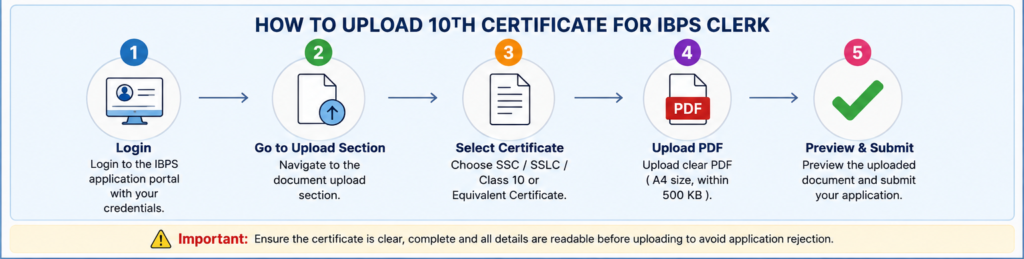
- Open the official CRP CSA-XVI application portal.
- Log in using the registration number and password.
- Complete the personal and educational details.
- Open the document-upload section.
- Locate the SSC, SSLC, Class 10 or equivalent certificate field.
- Click the relevant upload or browse button.
- Select the prepared PDF from your device.
- Click Open or Upload.
- Wait for the upload confirmation.
- Check the preview or uploaded-file status.
- Replace the PDF if it is unclear or incorrectly uploaded.
- Submit the form only after checking every document.
Read the complete IBPS Clerk Apply Online guide before completing registration.
7 Critical IBPS Clerk 10th Certificate Upload Errors
- Uploading a JPG instead of a PDF: The Class 10 certificate must be uploaded in PDF format.
- Using a file larger than 500 KB: Compress or rescan the certificate before uploading.
- Uploading a blurred scan: Names, dates and certificate details must remain readable.
- Cutting the certificate edges: Do not crop out the board name, seal, certificate number or candidate details.
- Uploading the wrong document: Do not upload Aadhaar, graduation marksheet or another certificate in this field.
- Using the wrong upload field: The Class 10 PDF must be uploaded only through its designated option.
- Skipping the final preview: Always check that the correct and readable PDF has been uploaded before final submission.
What If the Name or Date of Birth Does Not Match?
The details entered in the application form should be checked carefully against the candidate’s official certificates.
Common mismatch problems include:
- Different spelling of the first name;
- missing middle name;
- different surname;
- initial used instead of the complete name;
- date-of-birth difference;
- name changed after marriage; and
- typing error in the application form.
Can the Name Be Corrected Later?
Some important application fields may not be editable after final submission. Therefore, candidates should compare the application details with the Class 10 certificate before submitting the form.
Read the IBPS Clerk Form Correction guide for editable and non-editable fields.
Difference Between the Class 10 Certificate and Other Uploads
| Document | Format | Main Purpose |
|---|---|---|
| Class 10 Certificate | PDF, A4, up to 500 KB | Educational and identity-related record |
| Photograph | JPG/JPEG | Candidate photograph |
| Signature | JPG/JPEG | Candidate signature |
| Left-Thumb Impression | JPG/JPEG | Candidate thumb impression |
| Handwritten Declaration | JPG/JPEG | Declaration written by the candidate |
Check the IBPS Clerk Photo and Signature Size and IBPS Clerk Handwritten Declaration guides for the remaining document specifications.
IBPS Clerk 10th Certificate Upload Final Checklist
- The correct Class 10 or equivalent certificate has been selected.
- The file is in PDF format.
- The PDF page size is A4.
- The total file size is 500 KB or less.
- The candidate’s name is clearly visible.
- The date of birth is readable.
- The board name and certificate details are visible.
- No important part of the certificate is cropped.
- The PDF is not blurred, dark or smudged.
- The document has been uploaded in the correct field.
- The uploaded file has been checked before final submission.
Complete the IBPS Clerk Application
Prepare the Class 10 PDF and all other documents before starting registration.
Important Internal Links
- IBPS Clerk Notification 2026
- IBPS Clerk Apply Online
- IBPS Clerk Documents Required
- IBPS Clerk Photo and Signature Size
- IBPS Clerk Handwritten Declaration
Official External Links
Conclusion
The IBPS Clerk 10th Certificate Upload must be completed using a clear A4-size PDF that does not exceed 500 KB. Candidates should upload the SSC, SSLC, Class 10 or equivalent certificate only in the designated document field.
Before final submission, open the PDF and verify the candidate’s name, date of birth, board details and certificate information. Following the correct IBPS Clerk 10th Certificate Upload rules can prevent document errors and unnecessary application rejection.
Disclaimer: Candidates should verify the live application portal, official notification and subsequent IBPS instructions before final submission.
Practice free quizzes, mock tests, current affairs and exam-wise preparation resources on ExamTune.