
How to Get Computer Certificate for IBPS Clerk: 12 Easy Steps
Quick Overview
Practice free quizzes, mock tests, current affairs and exam-wise preparation resources on ExamTune.
Last Updated: 30 July 2026
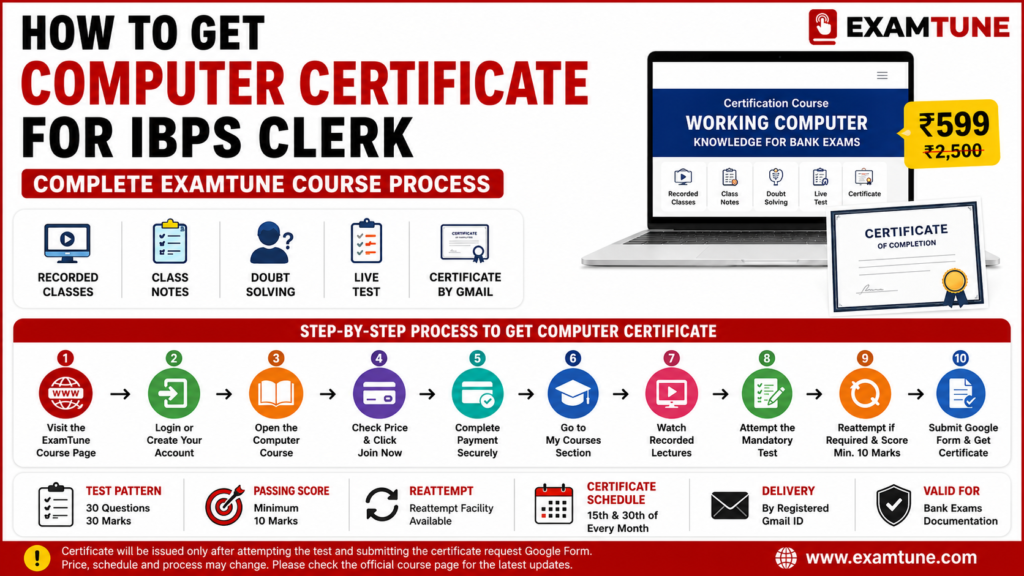
How to Get Computer Certificate for IBPS Clerk is a simple online process that includes course enrolment, recorded computer classes, a mandatory test, Google Form submission and certificate delivery through the registered Gmail address.
This guide explains the complete ExamTune computer certificate process, including course purchase, test pattern, minimum qualifying marks, reattempt facility and certificate-request instructions.
Quick Answer: How to Get Computer Certificate for IBPS Clerk
- Course: Working Computer Knowledge Certification Course
- Current listed price: ₹499, subject to change
- Class mode: Recorded online classes
- Study support: Class notes and doubt support
- Test: Mandatory
- Test pattern: 30 questions for 30 marks
- Minimum score: 10 marks
- Reattempt: Available when required
- Certificate request: Google Form submission
- Delivery: Registered Gmail address
Is Computer Certificate Required for IBPS Clerk 2026?
Computer literacy is an important eligibility condition in IBPS Customer Service Associate recruitment. Candidates are generally expected to possess operating and working knowledge of computer systems.
Depending on the wording of the active notification, computer knowledge may be supported through a relevant certificate, diploma, degree or proof that Computer or Information Technology was studied as a subject in school or college.
Candidates should verify the exact requirement through the official IBPS website. Final document acceptance remains subject to the active notification and verification by the recruiting or allotted bank.
Who Needs a Computer Certificate for IBPS Clerk?
A separate Computer Certificate for IBPS Clerk 2026 may be useful for candidates who have not studied Computer or Information Technology as a subject in Class 10, Class 12, college or graduation and do not possess another relevant computer qualification.
Candidates who have already studied Computer or IT should first check their marksheets and academic records. They should compare their available proof with the exact computer-literacy condition mentioned in the active IBPS notification.
Computer Certificate Course for IBPS Clerk Overview
The ExamTune course is listed as Certification Course – Working Computer Knowledge for Bank Exams. It includes recorded classes, study support, a mandatory assessment and a certificate-request process.
| Course Detail | Information |
|---|---|
| Course name | Certification Course – Working Computer Knowledge for Bank Exams |
| Current listed price | ₹499, subject to change |
| Learning mode | Recorded online classes |
| Study support | Class notes and doubt support |
| Assessment | Mandatory test |
| Test pattern | 30 questions for 30 marks |
| Minimum score | At least 10 marks |
| Reattempt | Available when required |
| Certificate request | Google Form after test completion |
| Delivery | Registered Gmail address |
Watch: How to Get Computer Certificate for IBPS Clerk
Watch the complete ExamTune guidance video to understand the computer certificate requirement, course process, mandatory test, reattempt facility and certificate delivery.
How to Get Computer Certificate for IBPS Clerk from ExamTune
Follow these 12 steps to complete the IBPS Clerk Computer Certificate course and certificate-request process.
Step 1: Open the ExamTune Computer Certificate Course
Visit the official Working Computer Knowledge Certification Course page:
Open the ExamTune Computer Certificate Course
Confirm that the website address begins with examtune.com before entering login or payment details.
Step 2: Check the Course Price and Features
Check the current course price, recorded-class access, study support, test instructions and certificate process. The price shown in this article may change, so the amount displayed at checkout should be treated as final.
Step 3: Login or Create an ExamTune Account
Existing students should log in using their registered account. New students should create an account using the correct full name, mobile number and active Gmail address.
Use the same account for payment, course access, the mandatory test and certificate communication.
Step 4: Click Join Now and Complete Payment
Click Join Now and complete the payment using the available online payment option.
Before payment, verify:
- course name;
- final payable amount;
- candidate’s full name;
- registered mobile number;
- registered Gmail address; and
- applicable offer or discount.
Save the payment receipt, transaction ID and confirmation screenshot.
Step 5: Open the Course from My Courses
Login using the same account and open the My Courses section. Select the purchased Working Computer Knowledge Certification Course.
If the course is not visible after successful payment, contact ExamTune support with the registered mobile number and transaction proof.
Step 6: Watch the Recorded Computer Classes
Open the Recorded Lectures section and watch the classes in the order provided. Recorded classes allow students to prepare according to their own schedule.
Step 7: Revise the Course Notes
Complete the required lectures and revise the available class notes before attempting the certification assessment. Use doubt support where available.
Step 8: Attempt the Mandatory Certificate Test
The mandatory assessment contains 30 questions for 30 marks. Students should check the live test instructions and timer before starting the assessment.
Step 9: Score at Least 10 Marks
Students must score at least 10 marks according to the supplied course process. Candidates who do not achieve the required score may use the available reattempt option.
Save a screenshot of the final result or test-completion status.
Step 10: Submit the Certificate Request Google Form
After completing the test and achieving the required score, submit the Google Form provided by ExamTune.
Enter the following information carefully:
- candidate’s full name;
- registered mobile number;
- registered Gmail address;
- course details;
- test score or completion information;
- payment details, where requested; and
- other details required in the form.
The certificate will not be processed merely by purchasing the course or watching the classes. Google Form submission is required under the supplied process.
Step 11: Receive the Certificate by Gmail
After successful test completion, form submission and verification, the certificate is sent to the registered Gmail address.
Check the Inbox, Spam and Promotions folders regularly. The processing period communicated inside the course or by ExamTune support will remain final.
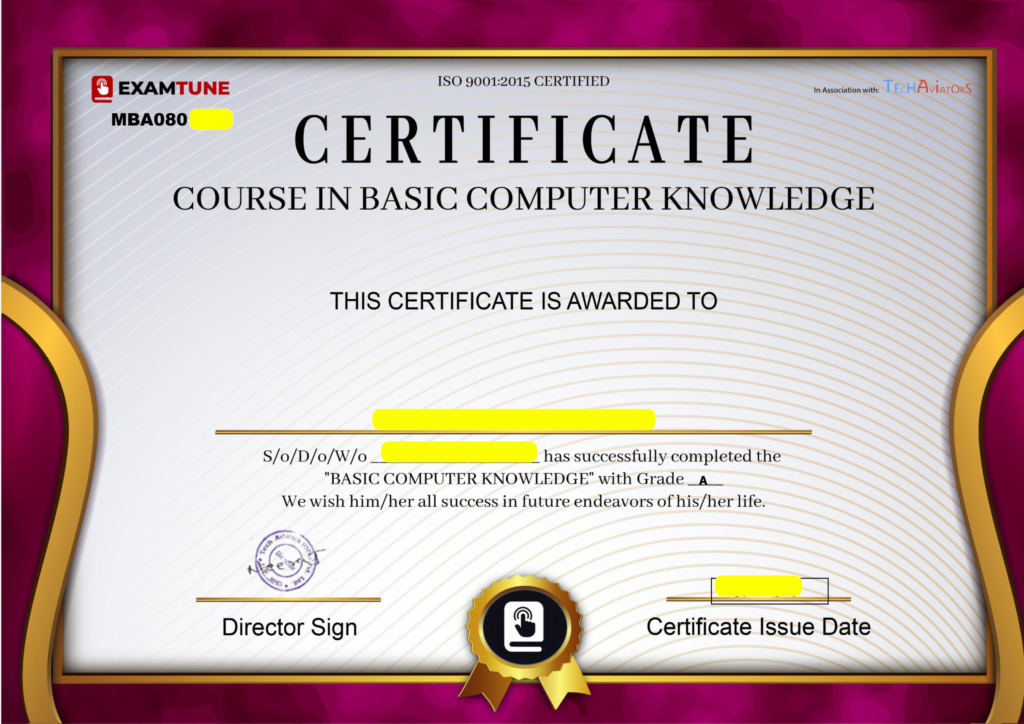
This is a sample certificate format. The final certificate name, serial number, issue date, grade, signature and verification details may vary.
Step 12: Download and Save the Certificate
After receiving the certificate, download the PDF and keep the following records safely:
- digital PDF copy;
- backup copy in cloud storage;
- printed certificate copy;
- payment receipt;
- test-result screenshot;
- Google Form submission proof; and
- certificate-verification details, where provided.
IBPS Clerk Computer Certificate Test Pattern
| Test Detail | Information |
|---|---|
| Total questions | 30 |
| Total marks | 30 |
| Test duration | Check the live test instructions |
| Minimum score | 10 marks |
| Test status | Mandatory for the supplied certificate process |
| Reattempt | Available when required |
Computer Certificate for IBPS Clerk Process in One Line
What to Do If the Course Is Not Visible After Payment?
If the course does not appear in My Courses after successful payment, contact ExamTune support and provide your registered mobile number and transaction proof.
- Phone/WhatsApp: 9988991801
- Email: support@examtune.com
- Support timing: 10:00 AM to 6:00 PM
Important Instructions for Students
- Use your correct full name during registration.
- Enter an active Gmail address.
- Confirm the final course price before payment.
- Save your payment receipt and transaction ID.
- Watch the required recorded lectures.
- Attempt the mandatory assessment.
- Score the required minimum marks.
- Submit the certificate-request Google Form.
- Check Gmail Inbox, Spam and Promotions folders.
- Download and safely store the certificate PDF.
Join the ExamTune Computer Certificate Course
Get recorded computer classes, study support, a mandatory test, reattempt facility and the certificate-request process through your ExamTune account.
Official Course and IBPS Resources
- ExamTune Working Computer Knowledge Certification Course
- ExamTune Computer Certificate Guidance Video
- Official IBPS Website
- Previous IBPS CSA Detailed Notification
Related IBPS Clerk Guides
- Computer Certificate for IBPS Clerk Eligibility Rules
- IBPS Clerk Eligibility Criteria 2026
- IBPS Clerk Documents Required 2026
- IBPS Clerk Apply Online Process
- IBPS Clerk Handwritten Declaration
- IBPS Clerk Syllabus 2026
- IBPS Clerk Salary 2026
- IBPS Clerk Exam Date 2026
How to Get Computer Certificate for IBPS Clerk: Conclusion
How to Get Computer Certificate for IBPS Clerk involves joining the course, completing the recorded classes, attempting the mandatory assessment, achieving the required score and submitting the certificate-request Google Form.
After successful processing, the certificate is sent to the registered Gmail address. Students should preserve their payment receipt, test result, form-submission proof and certificate PDF.
Frequently Asked Questions
What is the price of the ExamTune Computer Certificate course?
The course is currently listed at ₹599 against an original price of ₹2,500. The offer may change, so candidates should confirm the final payable amount at checkout.
Where can I buy the ExamTune computer course?
You can purchase the Working Computer Knowledge Certification Course from the official ExamTune course page.
Where will the purchased course appear?
After successful payment and activation, the course will appear in the My Courses section of the ExamTune website or app.
Are the computer course classes live or recorded?
The course includes structured recorded classes that students can watch at their own pace. Class notes and doubt-solving support are also provided.
Is the Computer Certificate test mandatory?
Yes. Attempting the test is mandatory for completing the certificate process. The certificate will not be processed only by purchasing the course or watching the lectures.
Can students reattempt the Computer Certificate test?
Yes. Students can reattempt the test when required. They should achieve the minimum required score before submitting the certificate-request Google Form.
How many questions are in the Computer Certificate test?
The test contains 30 questions carrying a total of 30 marks. Candidates should confirm the live timer and instructions displayed inside the enrolled course before starting.
What is the passing score for the test?
Students must score at least 10 marks in the 30-mark test to complete the required assessment process.
Is the Google Form compulsory for getting the certificate?
Yes. After completing the test and achieving the required score, students must submit the certificate-request Google Form with their correct name, mobile number and registered Gmail address.
How and when will the certificate be delivered?
The certificate is sent to the registered Gmail address after successful test completion, Google Form submission and processing. Students completing the current processing window may receive it by 31 July 2026; otherwise, processing may take approximately 15 days.
Practice free quizzes, mock tests, current affairs and exam-wise preparation resources on ExamTune.