
IBPS Clerk Degree Name Not Available? 5 Safe Rules
Quick Overview
Practice free quizzes, mock tests, current affairs and exam-wise preparation resources on ExamTune.
IBPS Clerk 2026 Official Notification PDF
Download the official IBPS Clerk 2026 notification to check educational qualification, application instructions, important dates, local language requirements and recruitment rules.
IBPS Clerk degree name not available in the application form is a confusing problem for candidates whose exact graduation degree, honours subject or specialisation does not appear in the dropdown list.
For example, your certificate may mention B.Sc. (Hons.) Mathematics, B.Com. Computer Applications, B.A. Programme, B.Voc., BMS or another university-specific course name, while the IBPS Clerk form may display only broader degree options.
In this situation, you should not select a random or unrelated degree merely to complete the form. First identify the main degree awarded by your university, compare it with the available options and use the safest matching option supported by your official documents.
Quick Answer
Select the exact degree name when it is available. If only the specialisation is missing but the broader degree shown on your certificate is available, select that broader degree only when it accurately represents your qualification. If the form provides an Other option, use it only when no accurate listed option is available. If you still cannot identify the correct option, save the application and contact IBPS before clicking Complete Registration.
What Do the Official IBPS Clerk Instructions Say?
Candidates applying for IBPS Clerk, officially called Customer Service Associate, must possess a graduation degree in any discipline from a recognised university or an equivalent qualification recognised by the Central Government.
The online application instructions require candidates to fill every field carefully and verify the information before clicking the Complete Registration button. Details entered in the application remain subject to later scrutiny by IBPS and the participating bank.
This means the graduation information entered in the form should be consistent with the candidate’s:
- Final degree certificate
- Provisional degree certificate
- Consolidated marksheet
- Final semester or year marksheets
- Official university records
Important: A successfully submitted application does not automatically confirm eligibility. Entering a convenient but incorrect degree option can create a mismatch during document verification.
Why Is Your Degree Name Not Available in the IBPS Clerk Form?
The exact degree name may be missing for several reasons:
- The form may use a broad degree category instead of every specialisation.
- Your university may use a unique or updated course title.
- The degree may include honours, vocational or multidisciplinary wording.
- The certificate may show the degree and specialisation together.
- The course may have been renamed by the university.
- The degree may be an integrated or dual-degree programme.
For example, a university may award B.Sc. (Hons.) Mathematics, while the application dropdown may display only B.Sc. The missing word “Mathematics” does not necessarily mean that B.Sc. is the wrong category. However, the broad option should be selected only when the actual degree awarded is clearly B.Sc.
IBPS Clerk Degree Name Not Available: Which Option Should You Select?
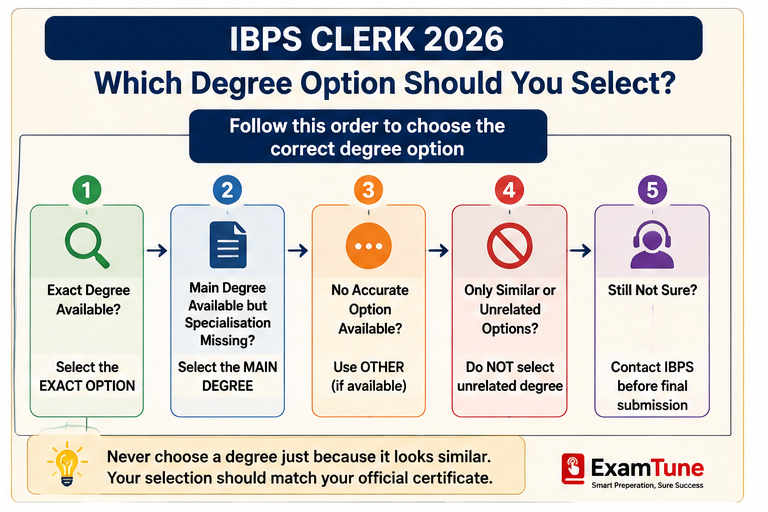
Use the following decision order:
| Situation | Recommended Action | Risk Level |
|---|---|---|
| Exact degree name is listed | Select the exact option | Low |
| Main degree is listed but specialisation is missing | Select the main degree only when it matches the degree awarded | Low to moderate |
| An Other option is available | Use Other if no accurate listed option exists | Moderate |
| Only similar but unrelated degrees are listed | Do not select an unrelated degree | High |
| No exact, broad or Other option is available | Save the form and contact IBPS | High if guessed |
Step 1: Check the Exact Degree Printed on Your Certificate
Do not rely only on the course name used by your college. Read the exact wording printed on your final degree, provisional certificate or consolidated marksheet.
For example:
- College description: Bachelor of Commerce in Computer Applications
- Degree awarded: Bachelor of Commerce
- Specialisation: Computer Applications
If the awarded degree is clearly Bachelor of Commerce, selecting B.Com. may accurately represent the qualification even when the specialisation is not separately listed.
Step 2: Identify the Main Degree and the Specialisation
Separate the qualification into two parts:
- Main degree: B.A., B.Sc., B.Com., B.Tech., BBA, BCA or another degree
- Specialisation: Mathematics, Computer Science, Finance, English, Economics or another subject
If the dropdown asks only for the degree name, select the main degree supported by your certificate. If the form separately asks for a specialisation, enter the exact specialisation in that field.
Step 3: Do Not Choose an Unrelated Degree
A candidate with B.Voc. should not automatically select B.A., B.Sc. or B.Com. merely because B.Voc. is missing. Similarly, a BMS candidate should not randomly select BBA unless the university documents officially establish the qualification as equivalent and the form instructions support that selection.
Similarity in syllabus does not make two degrees identical for application purposes.
Degree Name and Specialisation Are Not the Same
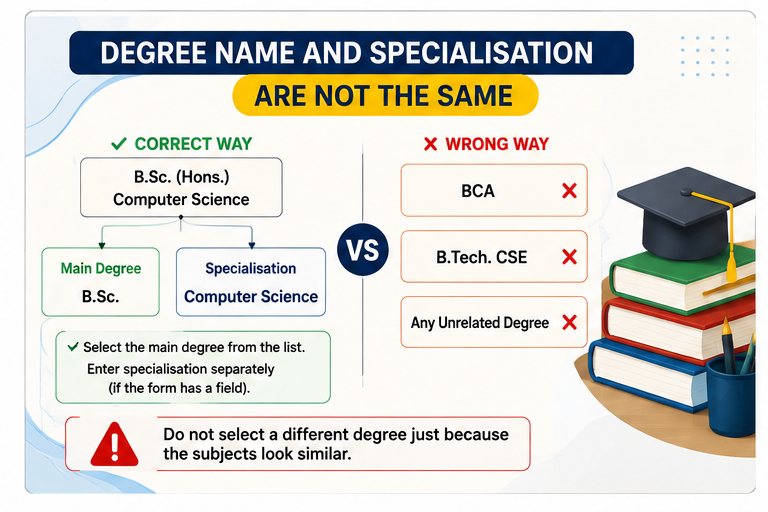
One of the most common mistakes is searching for the specialisation inside the degree-name dropdown.
Consider the following qualification:
B.Sc. (Hons.) Computer Science
- Main degree: B.Sc.
- Honours or specialisation: Computer Science
If B.Sc. appears in the degree list but Computer Science does not, the candidate should first check whether the form has a separate specialisation, subject or branch field.
Do not select BCA only because Computer Science is not shown. B.Sc. Computer Science and BCA are different degree titles.
Warning: Never select a degree merely because its syllabus appears similar to your course. The selected option should represent the qualification printed on your official university document.
Common Degree Examples and the Safer Approach
| Degree on Certificate | Possible Broad Option | What to Check |
|---|---|---|
| B.A. (Hons.) English | B.A. | Confirm that the awarded degree is B.A. and English is the honours subject. |
| B.Sc. Computer Science | B.Sc. | Do not replace it with BCA merely because Computer Science is missing. |
| B.Com. (Hons.) | B.Com. | Check whether honours is part of the specialisation rather than a different degree category. |
| B.Tech. Information Technology | B.Tech. | Enter Information Technology separately if a branch field is available. |
| B.Voc. | Other, if available | Do not convert it into B.A., B.Sc. or B.Com. without official guidance. |
| Integrated or Dual Degree | Depends on the live form | Do not split the qualification or select one component without clarification. |
Note: These examples explain how to identify the main degree and specialisation. They do not replace an official response from IBPS for an unusual qualification.
When Should You Select the Other Option?
Select Other only when:
- Your exact degree is not available.
- No listed broad degree accurately represents the qualification.
- The live application form provides an Other option.
- An additional field allows you to enter the exact degree name, where applicable.
If an additional text field appears, enter the degree exactly as printed on the official certificate. Avoid abbreviations that are not used by your university.
For example, if your certificate states:
Bachelor of Vocation in Banking, Financial Services and Insurance
Enter that official wording, subject to the character limit of the form. Do not rename the qualification as B.Com. merely because the subjects appear related to commerce.
What If No Suitable Degree Option Is Available?
If the exact degree, an accurate broad degree and an Other option are all unavailable, follow these steps:
- Do not click Complete Registration immediately.
- Use Save and Next to preserve the entered details.
- Take a screenshot of the available degree dropdown.
- Check the degree title on your final or provisional certificate.
- Raise a complaint through the IBPS Candidate Grievance Redressal System.
- Mention the examination name as CRP CSA-XVI.
- Ask which option should be selected for the exact qualification.
- Save the complaint number and written response.
Information to Include in the IBPS Complaint
- Exact degree name
- Name of the university
- Year of passing
- Available options shown in the dropdown
- Screenshot of the dropdown
- Your registration number, if already generated
Mask unnecessary personal information before attaching screenshots or certificates.
Suggested Complaint Message
My graduation degree is “[ENTER EXACT DEGREE NAME]” from “[UNIVERSITY NAME]”. This exact degree is not available in the CRP CSA-XVI application dropdown. The available options are [MENTION OPTIONS]. Please confirm which option I should select so that the application matches my official educational documents.
What If You Have Already Selected the Wrong Degree?
Before Complete Registration
Return to the educational qualification section, select the correct option and verify the complete application preview before submission.
After Complete Registration
Check the current IBPS edit-window notice and the fields allowed for correction. Do not assume that every educational field will necessarily remain editable.
If the qualification field cannot be corrected, raise a complaint through the official grievance system and retain the response. Do not submit multiple applications unless the official instructions specifically permit or advise it.
After making any permitted correction, download and save the latest application form for your records.
Can a Wrong Degree Option Cause Rejection?
It can create a problem when the selected degree does not match the qualification shown in the candidate’s official documents.
Possible issues include:
- Mismatch during document verification
- Difficulty establishing educational eligibility
- Request for clarification by the participating bank
- Rejection if the entered information is found incorrect or misleading
A minor difference involving only a specialisation may not have the same effect as selecting an entirely different degree. However, candidates should not make assumptions about acceptance. The safest approach is to enter details that can be directly supported by university documents.
Final Checklist Before Selecting the Degree Option
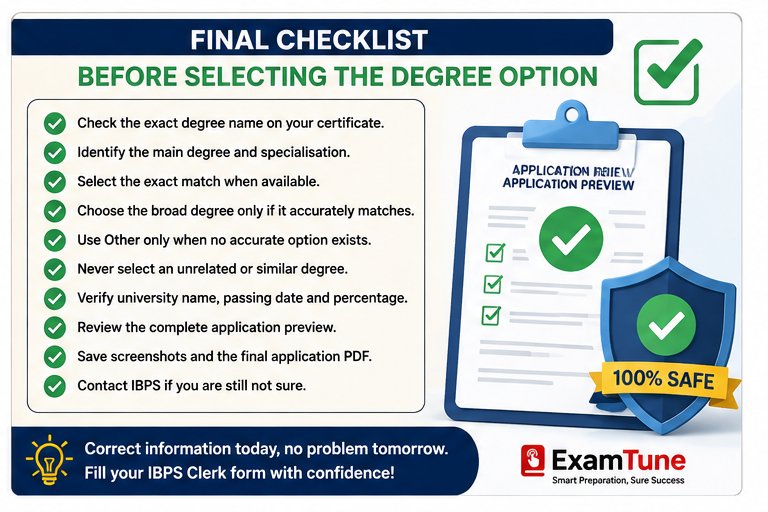
- Check the exact degree name on your certificate.
- Separate the main degree from the specialisation.
- Select the exact match when available.
- Select a broad degree only when it accurately represents the awarded qualification.
- Use Other only when the live form provides it and no accurate option is listed.
- Never select an unrelated degree.
- Check the university name, passing date and percentage.
- Review the complete application preview.
- Save screenshots and the final application PDF.
- Contact IBPS when the correct selection remains unclear.
Exact Degree Available = Select the Exact Degree
Only Specialisation Missing = Check the Main Degree
No Accurate Option Available = Contact IBPS, Do Not Guess
Preparing for IBPS Clerk 2026?
After completing your application correctly, check your preparation with ExamTune mock tests and practice quizzes.
Final Answer
If you are facing the IBPS Clerk degree name not available problem, first check the exact main degree printed on your final certificate, provisional certificate or consolidated marksheet.
If only the honours subject, branch or specialisation is missing, select the broader degree only when that option accurately represents the qualification awarded by your university. Do not select a random, similar-looking or unrelated course merely to complete the form.
If an Other option is available, use it only when no accurate listed option exists. If the correct selection is still unclear, save the application and obtain written guidance from IBPS before clicking Complete Registration.
Official Sources
The IBPS Clerk Graduation Subject Not Listed issue does not change the basic graduation eligibility requirement. The main concern is entering educational details that correctly match the candidate’s official degree and marksheets.
Candidates should check the current notification, live application instructions and grievance system before selecting a degree option.
- IBPS Clerk CRP CSA-XVI Official Notification
- IBPS Clerk Official Application Page
- IBPS Candidate Grievance Redressal System
Disclaimer: The public IBPS instructions do not provide a universal mapping table for every university-specific degree title. This article explains a cautious method for identifying the correct option. Final eligibility and acceptance of educational details are determined by IBPS and the participating bank.
Helpful IBPS Clerk Application Guides
If you are unsure about your graduation details, first read our
IBPS Clerk Educational Qualification guide
to understand the basic graduation requirement.
If you have already entered an incorrect subject or qualification, check the
IBPS Clerk Form Correction guide
before submitting another application.
Keep all required certificates and marksheets ready with the help of our
IBPS Clerk Documents Required guide.
Before clicking Complete Registration, use the
IBPS Clerk Final Form Preview Checklist
to review every important field.
If you have accidentally submitted two registrations, read our
IBPS Clerk Multiple Applications guide
to understand which form should be checked.
After submission, you can also use our
IBPS Clerk Application Status guide
to verify the form status.
Frequently Asked Questions
What should I do if my degree name is not available in the IBPS Clerk form?
Check whether the main degree is available without the specialisation. Select it only when it accurately represents the qualification shown on your certificate. Otherwise, use the “Other” option if available or contact IBPS for clarification.
Can I select B.Sc. if my degree is B.Sc. Computer Science?
You may select B.Sc. if B.Sc. is the main degree awarded by your university and Computer Science is the specialisation. Also check whether the form provides a separate field for the subject or branch.
Can I select BCA for B.Sc. Computer Science?
No. BCA and B.Sc. Computer Science are different degree titles. Select the option that matches the degree officially awarded by your university.
Can I select B.Com. for B.Com. Honours?
B.Com. may be the correct broad option if the official degree awarded is B.Com. and Honours is part of the course description. Verify the exact wording printed on your certificate.
Should I select “Other” when my degree is missing?
Select “Other” only when the application form provides this option and no listed degree accurately represents your qualification.
What should I enter after selecting “Other”?
If an additional field appears, enter the exact degree title printed on your official degree certificate or provisional certificate. Follow the character limit shown in the form.
Can I select a similar degree if my qualification is not listed?
No. A similar syllabus does not make two degrees identical. Do not select an unrelated or similar-looking degree without official clarification.
What should an integrated-degree candidate select?
Do not split, rename or change an integrated qualification on your own. Check the available options and contact IBPS if the correct selection is unclear.
Can the wrong degree option be corrected later?
Check the current IBPS correction or edit-window notice and the fields allowed for correction. Do not depend on a future correction window. Verify the degree option carefully before final submission.
How can I contact IBPS about a missing degree option?
Raise a complaint through the IBPS Candidate Grievance Redressal System. Mention the examination name, exact degree title, university name and the options available in the dropdown.
Practice free quizzes, mock tests, current affairs and exam-wise preparation resources on ExamTune.